Best construction fleet management software: Features, platforms and buying tips
Compare the top construction fleet management software platforms, learn what they do and get a step-by-step framework for choosing the right fit for your fleet.

By Geotab Team
Sep 9, 2026
Key Insights
- Construction fleet management software combines GPS tracking, maintenance scheduling and utilization reporting for mixed fleet vehicles and heavy machinery.
- The best platforms track powered equipment, on-road vehicles and non-powered assets like trailers and attachments in one system.
- Look for OEM telematics integration, preventive maintenance triggers and mobile tools built for field teams without reliable cell service.
- Pricing is typically quote-based, so budget for hardware, subscription and implementation before comparing vendors.
Construction fleets suffer when equipment sits idle on a job site, goes missing between locations or breaks down without warning. Only 8.5% of construction projects are completed on time, with equipment downtime often resulting in delays. Construction fleet management software helps contractors avoid these problems before they happen.
Fleet management software combines telematics and asset tracking into an industry-specific tool made to monitor heavy machinery, light vehicles and attachments across job sites. The solution combines GPS tracking, predictive maintenance scheduling, utilization reporting and job site dispatching into one place, creating a single source of truth.
This guide covers the best platforms for general contractors and field managers, listing the features that matter most, providing a step-by-step decision framework and explaining what to expect from implementation.
Top construction fleet management software platforms
Contractors researching fleet management software for construction will find both specialized construction tools and broader telematics platforms adapted for job site use. Below is an objective breakdown of six platforms, providing features and limitations.
Geotab
Geotab is an open-platform telematics solution that provides engine diagnostics, GPS tracking and data analytics for complex construction fleets. Customizable dashboards combine standardized data from a wide range of equipment types together in one place.
.jpg)
Geotab offers a wide range of key features:
- AI-powered dual-facing dash cams with driver safety scoring
- Real-time GPS tracking and customizable dashboards
- Engine diagnostic trouble code (DTC) monitoring and automated maintenance alerts
- Open SDK and MyGeotab Marketplace for third-party construction app integrations
- OEM telematics data aggregation across major equipment brands
Tenna
Tenna is built specifically for the construction industry to track heavy machinery, highway vehicles and small tools in a single system.
.jpg)
Tenna offers a wide range of key features:
- Multi-technology tracking using cellular GPS, Bluetooth beacons and QR codes
- Built-in dispatching and job site asset allocation
- OEM telematics integration with major machinery manufacturers
- Maintenance scheduling and cost accounting
Tenna's upfront implementation costs can be a concern for some. Reviews have cited high implementation costs and said that fees were not fully explained upfront in the past.
Samsara
Samsara is an integrated IoT platform that emphasizes video-based driver safety, real-time tracking and site operations.
.jpg)
Samsara offers a wide range of key features:
- Live GPS tracking with geofencing
- Automated Hours of Service (HOS) logging and DVIR compliance
- Asset tracking sensors for equipment temperature and engine usage
Reviewers have found Samsara's core capabilities sometimes lacking, though, speaking specifically to how they sometimes have to manage inaccuracy issues like false notifications and unreliable driving scores.
HCSS Equipment360
HCSS Equipment360 is a specialized maintenance and fleet management solution made for heavy civil, paving and utility contracts.
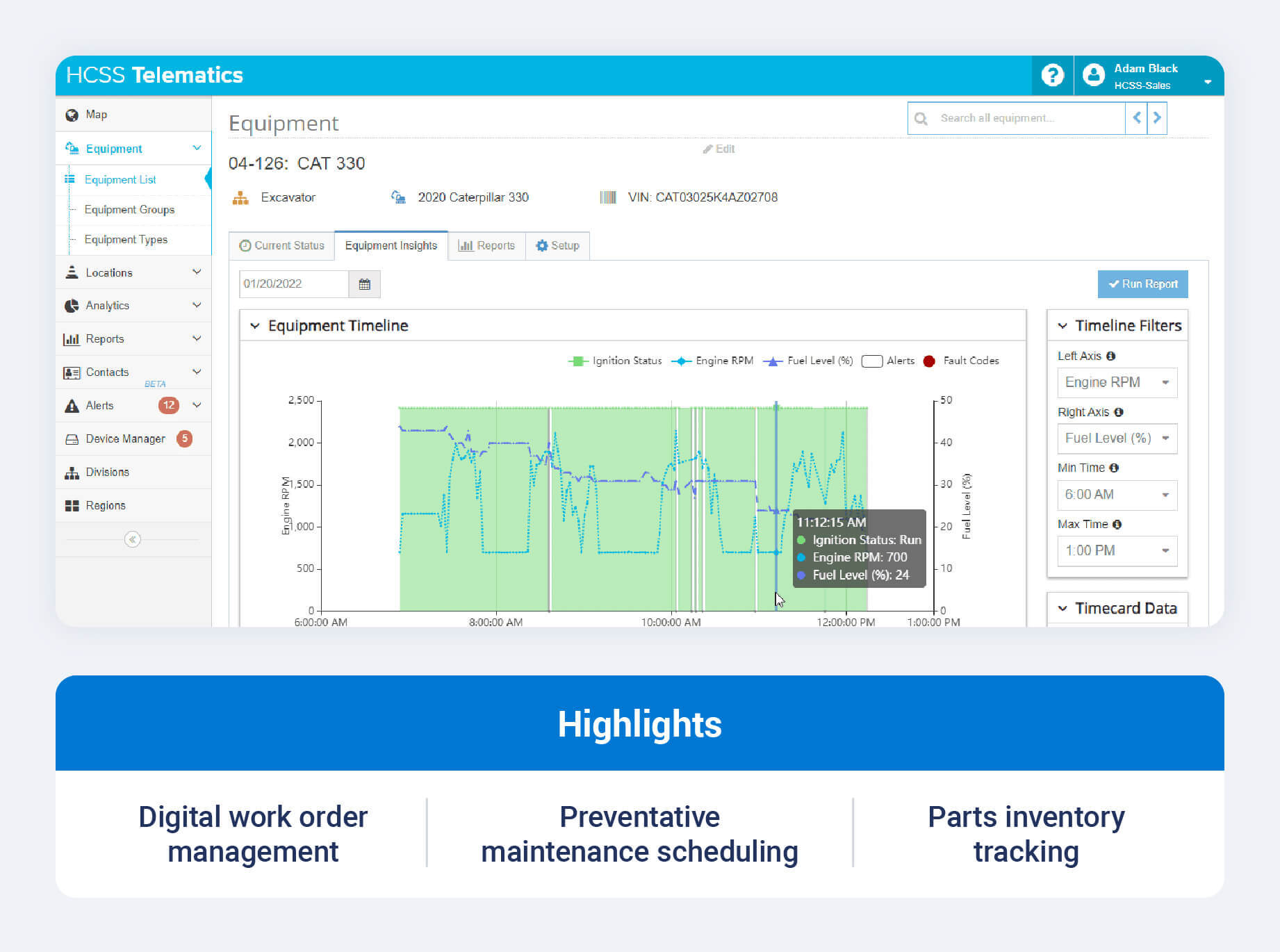
HCSS Equipment360 offers a wide range of key features:
- Automated preventive maintenance scheduling based on engine hours and fuel consumption
- Digital work order creation, time card tracking and mechanic labor allocation
- Parts inventory management with automated reorder alerts
- Seamless native integration with HCSS HeavyBid, HeavyJob and E360 mobile apps
HCSS Equipment360 is not without its drawbacks. Some customers find Equipment360 expensive and difficult to customize, citing costly annual maintenance fees for smaller companies as a notable con.
Fleetio
Fleetio is a cloud-based fleet maintenance platform offering user-friendly tracking of service histories, vehicle health and costs. As a construction equipment management software option, it suits contractors focused on maintenance workflows.
.jpg)
Fleetio offers a wide range of key features:
- Automated maintenance reminders and outsourced vendor management
- Mobile app for digital vehicle inspections, fuel logging and work order approval
- Parts inventory tracking and shop management tools
- Fuel card integrations for automated MPG and expense reporting
Fleetio's biggest con is that its third-party GPS integrations can be difficult to set up. Customers have also reported that onboarding can be challenging because of the platform's complexity.
Verizon Connect
Verizon Connect is an enterprise commercial fleet telematics platform. Its most notable features include GPS tracking, driver management and field workforce visibility.
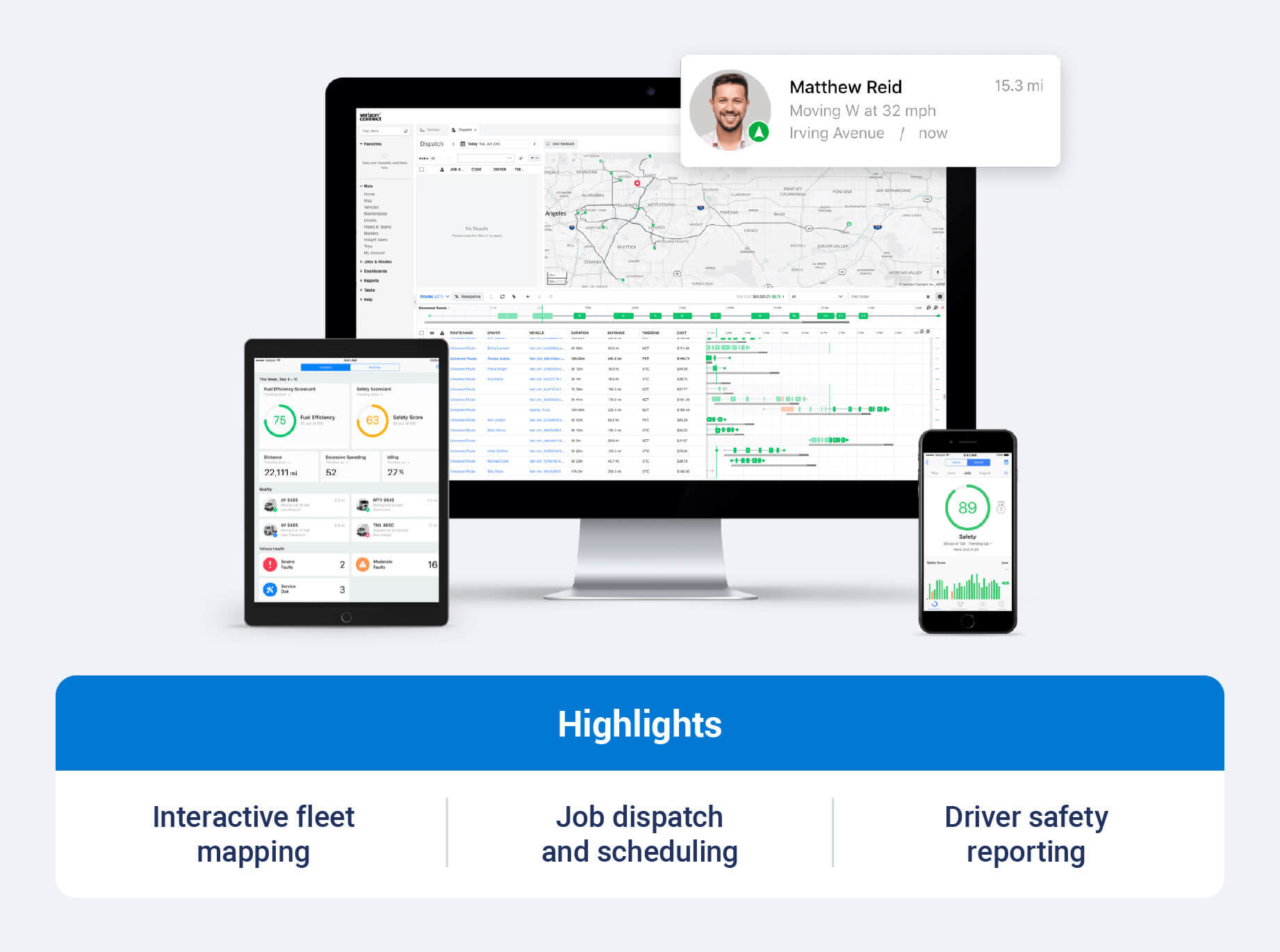
Verizon Connect offers a wide range of key features:
- Real-time GPS tracking and interactive fleet mapping
- Driver behavior scoring, speed tracking and safety reporting
- Field service management, job dispatching and worker scheduling tools
- Customizable geofencing alerts and automated arrival and departure logs
Some customers have reported reliability issues with Verizon Connect equipment. Others have reported that poor customer service can be a drawback.
What does construction fleet management software do?
No matter if owner-operators call it construction equipment fleet management software or a telematics platform, most platforms provide the same core offerings. Fleet managers who understand these capabilities are able to better the platform that best fits their needs.
GPS tracking and asset location
Real-time GPS tracking gives contractors live location visibility for vehicles, machinery and equipment across scattered job sites. Fleet managers can use the software to locate a missing skid steer instead of searching for it manually.
Geofencing lets contractors define virtual boundaries around project sites or equipment yards. The software can alert managers when machinery leaves a designated zone after hours, which helps identify potential theft.
For non-powered assets like trailers, attachments and generators, GPS tracking for construction equipment can use Bluetooth beacons to close blind spots.
Equipment utilization tracking
Utilization tracking calculates true working time versus engine idle time using ignition sensors, PTO engagement and movement data. This distinction matters because engine runtime does not always indicate productive use. A machine may have a running engine while sitting idle or waiting for its next task.
Low utilization reporting helps equipment managers decide if it is time to redeploy, sell or rent underused machinery. Real-time site utilization data also prevents unnecessary rentals by flagging idle assets already available nearby, one of the fastest ways construction asset management software pays for itself.
Preventive maintenance scheduling
Construction fleet management software can automate maintenance triggers based on engine hours, mileage or calendar intervals. This helps replace manual maintenance logs with digital records.
Digital work orders let field technicians receive assignments on a mobile device, complete inspection checklists, attach photos and update service histories from the field. Predictive fleet maintenance tools can also use diagnostic data to flag developing issues before they cause a breakdown.
Parts and inventory management ties work orders to spare parts, ensuring required components are in stock before they need to schedule downtime.
Dispatching and resource management
Visual dispatching boards let operations teams schedule and assign equipment to specific jobs, drivers or haulers, eliminating the phone tag and spreadsheets that slow down a busy office.
Resource scheduling workflows help balance heavy machinery across multiple active sites, so project timelines are met without over-allocating assets to one job while another sits short-handed.
Safety and compliance
Driver and operator safety monitoring tracks speeding, hard braking, rapid acceleration and seatbelt usage through telematics sensors. Video telematics and AI dash cams can document incidents, help defend drivers against false claims and support targeted coaching.
Regulatory compliance features round out this pillar, including digital DVIR, HOS electronic logging and OSHA-aligned safety documentation.
OEM telematics and software integrations
OEM telematics integration pulls standardized data directly from built-in manufacturer systems, so equipment managers are not logging into a different portal for every machine brand on site.
Integrations with construction ERPs and project management platforms such as Procure, Viewpoint, Sage and QuickBooks sync job costing, equipment billing rates and payroll. Native API integrations can also help construction fleets connect specialized software with their broader business systems.
Key features to look for in construction fleet management software
Beyond a generic feature list, the following section breaks down the best construction fleet management software features that address the specific way contractors work. Understanding why each feature matters helps buyers avoid paying for capabilities they will not use, while making sure the essentials are covered.
Mixed-fleet tracking
Construction fleets can include heavy machinery such as excavators, dozers and cranes; light- and medium-duty vehicles like pickups and service trucks; and even non-powered assets like trailers, attachments and pumps.
A single view across all three categories prevents operational silos, where one asset type is closely monitored while another is more likely to be lost or stolen.
Maintenance management
Look for preventive maintenance schedules that can use multiple triggers, including engine hours, mileage and calendar days. This flexibility matters because a crane and a pickup truck do not require maintenance on the same schedule.
Predictive maintenance functionality uses diagnostic trouble codes and telematics alerts to flag engine faults before they lead to a breakdown. As the best equipment maintenance software has matured, offline mobile work order capacity has become a baseline requirement for mechanics working at remote sites without cellular service.
Reporting and cost tracking
Essential reporting outputs include:
- Asset utilization summaries
- Fuel burn rate
- Idle time percentage
- Maintenance cost history
- Total cost of ownership per operating hour
Cost tracking at the asset level supports accurate rent versus buy analysis, which matters when deciding whether to add a machine to a fleet or bring in a rental for a single project. Strong cost management in off-road fleets depends on having this detail by asset, not just by fleet.
Mobile accessibility
Job site personnel work in the field, so field supervisors, mechanics and operators need intuitive native mobile apps for iOS and Android, not just a desktop tool.
Essential mobile features include digital pre-trip inspection forms, equipment check-in and check-out scanning through QR codes and photo upload for damage reports.
Scalability and user permissions
Look for software that can scale from a small fleet to an enterprise operation with hundreds or thousands of assets. Granular role-based permissions can also ensure that operators, superintendents, maintenance staff and executives see the data relevant to their roles.
Customer support and implementation
Implementation support is a critical purchasing criterion, since construction delays carry high penalty costs and a slow rollout can offset software savings.
Look for high-touch implementation support that includes a dedicated onboarding manager, custom data migration assistance, hardware installation support and access to a technical help desk.
How to choose construction fleet management software
Once you understand the core pillars and features, choosing a platform comes down to how well it fits your fleet and operations. The following steps can help narrow down a shortlist of platforms worth evaluating.
Define your fleet composition first
Fleet asset mix should drive software selection. A 200-asset mixed fleet with excavators, haulers and trailers has different needs than a 50-vehicle light service fleet.
Start with a fleet audit to take stock of your:
- Heavy machinery
- On-road vehicles
- Non-powered attachments
- Number of active job sites
Identify your biggest operational pain points
Common construction pain points include unauthorized equipment usage, unexpected breakdowns, high idle fuel consumption, lost tools and manual logbook errors.
Map your top three operational bottlenecks directly to the corresponding software capability before shopping. This prevents fleets from paying for unnecessary features when they only need two or three specific capabilities.
Evaluate integration requirements
Integration capability eliminates manual double entry across accounting, estimating and project management systems. Ask vendors directly about connections to Procure, Viewpoint, Sage, QuickBooks, foundation software and OEM telematics feeds.
A platform that checks every other box but cannot connect to your ERP will likely create more administrative work, not less.
Ask the right questions during a demo
Bring a structured list of questions to every demo:
- How does the system track non-powered attachments and small tools in the field?
- Which OEM telematics feeds connect natively via AEMP 2.0?
- Are preventive maintenance triggers based on engine hours, mileage, calendar days or all three?
- What is the mobile experience for field mechanics working offline?
- What onboarding resources are included, and what is the timeline?
- Which reporting dashboards are included, and which require paid custom setup?
Understand the total cost of ownership
Fleet telematics software is typically priced by custom quote, not flat rate, which makes total cost of ownership (TCO) harder to assess and compare across platforms. This can make it harder to evaluate the full cost of each solution.
Hidden expenses like telematics hardware, OBD or CAN bus harnesses, cellular data plans, implementation fees or per-user seats are often overlooked. Unplanned construction downtime costs are frequently the largest line item in a fleet's budget. Build an ROI case that weighs the investment against savings from reduced downtime and lower fuel spend.
Improve visibility and productivity with construction fleet management software
The right construction fleet management software should match your fleet composition, integration needs and budget. Geotab's construction fleet solutions bring GPS tracking, maintenance insights and open platform integrations to help fleets manage vehicles and equipment across job sites.
Subscribe to get industry tips and insights
Frequently Asked Questions
Construction fleet management software is designed for mixed fleets that may include heavy machinery, on-road vehicles and non-powered assets. It can also support job site workflows like equipment dispatching and hour-based utilization tracking.
Yes, construction fleet software can track non-powered assets. Construction platforms can track non-powered assets like trailers, attachments and generators using long-life battery-powered GPS trackers, solar units or Bluetooth BLE tags linked to a field mobile app.
Construction fleet management software usually requires a custom quote. Pricing can vary depending on fleet size, tracking hardware type and software methods selected. Buyers should budget for hardware fees, monthly subscriptions per asset and onboarding implementation costs.
Implementation time can vary significantly by fleet size and integration requirements. Smaller fleets with simpler hardware installations may have shorter rollouts, while enterprise fleets requiring OEM telematics integrations, custom ERP connections and extensive field training may take longer.
Key integrations to look for include construction accounting and ERP systems like Procure, Viewpoint, Sage and QuickBooks, OEM telematics platforms like Caterpillar VisionLink and Komatsu JDLink and fuel card management platforms.
Yes, construction fleet software does help with equipment theft. Real-time GPS tracking, after-hours movement alerts and automated geofencing provide immediate theft notifications and actionable location data to assist law enforcement with asset recovery.
The Geotab Team write about company news.
Table of Contents
- Top construction fleet management software platforms
- What does construction fleet management software do?
- Key features to look for in construction fleet management software
- How to choose construction fleet management software
- Improve visibility and productivity with construction fleet management software
Subscribe to get industry tips and insights
Related posts
Four ways to transform garbage fleet efficiency with data and video tools
September 28, 2026
4 minute read

Why the OEM versus device-level telematics debate misses the point for mixed-fleet operators
September 25, 2026
2 minute read

6 benefits of an open, AI-powered fleet data platform
September 17, 2026
8 minute read

Field service GPS fleet tracking: what mid-market fleet managers need to know
September 15, 2026
4 minute read
Best software for small trucking companies: 5 tools to streamline your fleet
September 4, 2026
4 minute read