GPS tracking for heavy construction equipment: How it works, benefits & best systems
Managing heavy equipment across multiple job sites is a challenge. Learn how GPS tracking for construction equipment works, what features matter most and how to choose the right system for your fleet.

By Jason Widla
Jul 3, 2026
Key Insights
- GPS tracking for construction equipment gives fleet managers real-time visibility into location, engine hours and usage data across every active job site.
- GPS tracking systems rely on a combination of hardware, cellular or satellite connectivity and cloud software to continuously transmit and store equipment data in the field.
- Key features to look for include geofencing, engine hour tracking, idle time reporting and maintenance scheduling.
- Choosing the best system for your organization means matching hardware, software and support to your fleet size, asset mix and job site conditions.
Construction fleets walk a careful line between managing equipment, keeping it safe from theft and meeting deadlines. Crews lose hours searching for misplaced equipment, resulting in project delays and a staggering $30-$40 billion lost due to inefficiencies. That is where GPS (Global Positioning System) tracking for construction equipment comes in.
GPS tracking for construction equipment is hardware installed directly on heavy machinery like excavators, graders, generators or trailers. It sends real-time location, engine hours and usage data to cloud-based asset tracking software.
Whether you are a fleet manager choosing your first equipment tracker or replacing an outdated solution, learn everything you need to know below.
Why construction fleets are harder to manage
Construction equipment tracking is more complicated than managing a standard commercial vehicle fleet. Assets move frequently between sites, often without a clear handoff process. Unauthorized use is more difficult with machines that have no ignition key like compactors, generators or lighting towers.
This matters because the stakes are high. The construction industry saw 300 equipment theft incidents, resulting in nearly $8 million in losses during a single high-risk holiday period. Active tracking deters theft and improves recovery rates.
Beyond theft, an unplanned downtime event on a critical piece of machinery can delay a project timeline and trigger contract penalties. Manual tracking methods fall short. Understanding the full range of construction vehicles in your fleet is just the start.
How GPS tracking works for construction equipment
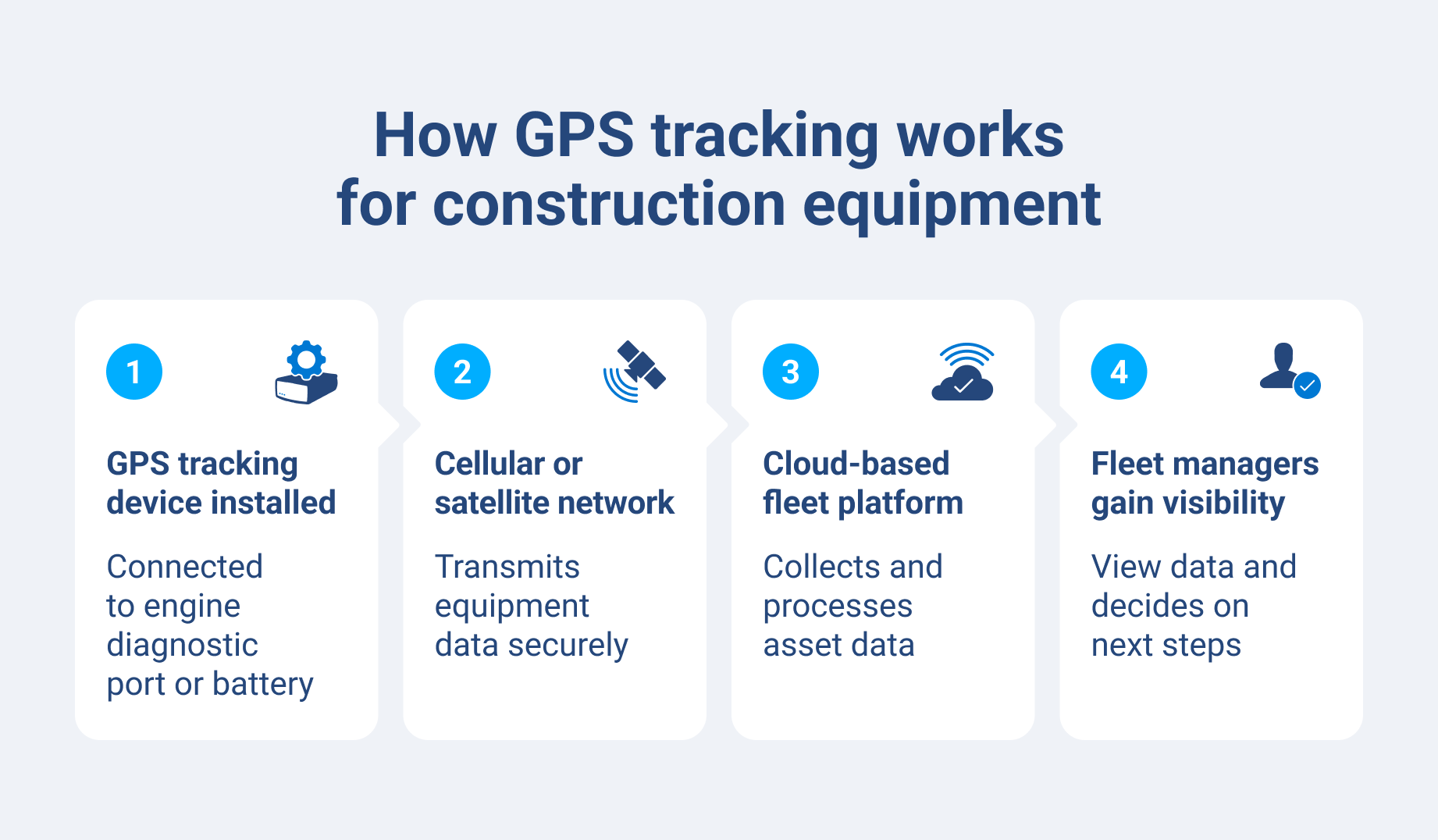
A construction equipment GPS tracker has three core components:
- A hardware device installed on or hardwired into the asset
- A cellular or satellite connection that transmits that data
- A cloud-based software platform where fleet managers view and analyze that data
Installation can be as straightforward as connecting to the asset's engine diagnostic port or hardwiring directly to its battery. The right approach depends on whether the asset has a diagnostic port and the level of data you want to capture.
The data points you can track far surpass simple location provided by a standard GPS or visuals provided by a dashcam:
- Engine hours
- Ignition status
- Idle time
- Fuel consumption
- Geofence alerts
For assets connected to an engine diagnostic port, you can also access fault codes and engine temperature, giving maintenance teams early warning signals before breakdowns.
Though most fleets use a hybrid approach, this model uses two tracking modes:
- Active tracking: Delivers continuous, near real-time updates. Best for high-value machinery or equipment in theft-prone areas.
- Passive tracking: Stores data locally and uploads it when the device reconnects to a network. Best for lower-risk assets in areas with limited cellular coverage.
You can also sync telematics data from your equipment tracker with data from your project management or accounting software through an open platform API. That connection ties equipment usage to project costs, so operations managers have a better understanding of where their money is going on each job.
GPS vs. QR code vs. Bluetooth: Which tracking method suits construction?
Not all assets on your job sites should use the same type of tracker. The three main tracking methods used in the construction industry are best suited to different types of equipment and operating conditions:
| Tracking type | Best for | Key strengths | Limitations |
| GPS tracking | Heavy equipment asset tracking | Real-time location, engine data, geofence alerts | Requires power source, highest cost per asset |
| QR code tracking | Hand tools and small assets | Low cost, simple deployment | Requires manual scanning, no real-time location data |
| Bluetooth (BLE) beacons | Small assets within a defined area | Low cost per tag, low battery usage | Limited range (job site or equipment yard only) |
Most construction fleets use all three methods simultaneously. Matching the tracking method to the asset type and replacement value keeps costs in check without leaving operational blind spots.
Key features to look for
It is important to note that beyond GPS tracking, there are many other specific benefits of using telematics in construction and on different types of construction vehicles.
- Real-time location tracking: Know where every asset is, across every job site, at any moment. Eliminate the need for phone calls and guesswork that only slow down dispatch decisions.
- Geofencing: Define virtual boundaries around sites or yards, and set up alerts for unauthorized entry or exit.
- Engine hour tracking: Monitor actual usage to schedule preventive maintenance accurately. Relying on calendar dates leads to over-servicing some machines and missing others.
- Idle time reporting: Identify machines running without productive fleet work to cut fuel costs and engine wear.
- Theft alerts and immobilization: Receive instant alerts for unauthorized movement or ignition activity outside scheduled hours. Some systems also support remote engine disable features for higher-risk assets.
- Maintenance scheduling: Trigger service reminders based on engine hours or mileage, not just calendar dates, so maintenance is tied to actual usage.
- Multi-site visibility: View all assets across every active job site from a single dashboard. This allows dispatchers and project managers to make fast, informed decisions without switching between tools.
- Reporting and utilization data: Use data to identify underused assets that could be redeployed or sold.
Common challenges in construction equipment tracking
Multi-site visibility is the biggest operational challenge for most construction fleet managers. Knowing exactly where each asset is and if it is in use, idle or being moved requires constant coordination. Without a centralized system, project managers often have to make slow decisions and run into scheduling conflicts.
GPS tracking for construction equipment solves this by giving dispatchers and project managers a single, real-time map view of every asset. Geofencing adds another layer, sending automatic alerts when equipment leaves a designated site boundary and eliminating the need for manual check-ins.
For teams managing heavy equipment, GPS tracking devices completely transform visibility. These tools enable a fleet manager overseeing five active sites to reassign an underused excavator in minutes based on a map view instead of waiting for callbacks.
How GPS tracking helps prevent equipment theft
Security in construction sites is a major concern for business owners. The National Equipment Registry reported a staggering nearly $8 million in total loss value from just 320 equipment theft incidents over a holiday weekend. When security is an issue, companies must take control and proceed with the proper measures. With the right technology, these problems can be fixed and properly monitored.
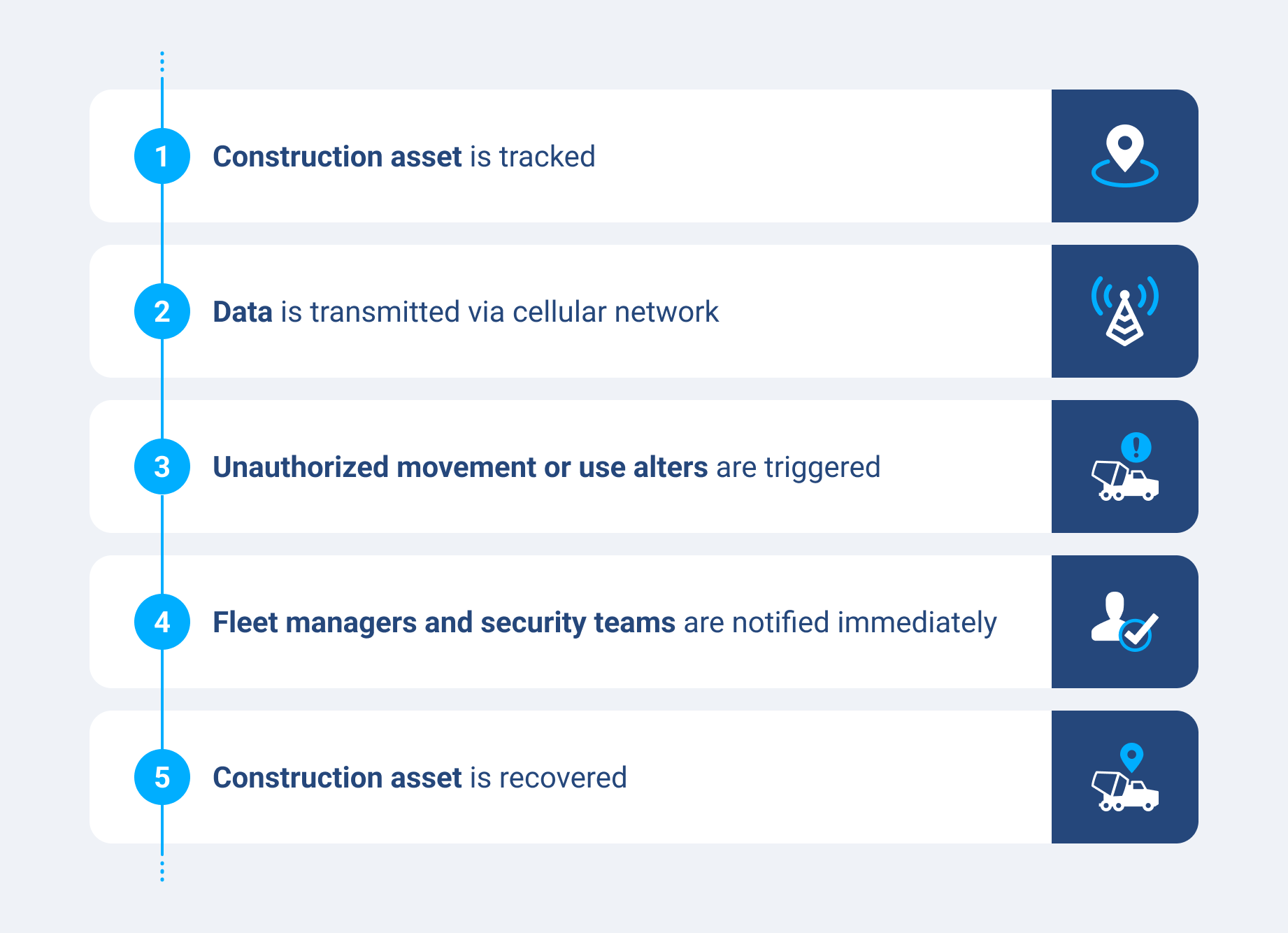
GPS tracking for construction operations deters theft and improves recovery. By offering real-time location alerts and after-hours movement notifications, fleet managers are alerted of unauthorized activity the moment it happens. You can also track engine hours and ignition data to detect unauthorized use.
For high-value assets, remote monitoring features can flag suspicious patterns before a machine ever leaves the site. Insurers take note of this, and often offer premium reductions for fleets with active GPS tracking.
How to choose the right GPS tracking system
Choosing an equipment GPS tracker is a practical decision that comes down to five major factors:
- Asset compatibility: Confirm your chosen system supports your full asset mix — wheeled vehicles, tracked machines, trailers and non-powered assets like generators and scaffolding. A system that only covers engine-equipped vehicles leaves essential gaps.
- Ease of installation: Hardwired devices deliver richer data but require one to two hours of professional installation per asset. Simpler installation options connect in minutes and work well for non-powered or battery-dependent assets.
- Software usability and integration: Evaluate how quickly your team can navigate the dashboard and whether the platform connects to your existing project management or accounting tools via an open platform API.
- Scalability and support: Check if the system can grow with the fleet and what level of customer support (phone, chat, account manager) is provided.
- Pricing and contracts: Most systems use per-asset monthly pricing, which scales predictably with fleet size. Review contract terms carefully, including activation fees, data plan costs and exit clauses, before committing.
How much does GPS tracking for construction equipment cost?
When comparing vendors, always calculate the total cost of ownership, not just the monthly subscription. Industry pricing typically ranges from about $10 to over $60 per vehicle per month for software depending on device type and capabilities. You should also factor in hardware cost, activation fees, data plans, installation time and staff training.
A lower price with a rigid contract and limited support can cost you more over time than a slightly higher-priced platform with strong account management.
Pricing structures vary by vendor, but most fall into one of these four models:
- Per-asset pricing: This is the most common model for construction fleets. It charges a monthly fee per device. It is predictable and scales directly with fleet size.
- Per-seat pricing: Charged per user login. This can be cost-effective for large fleets managed by a small operations team.
- Custom/bundled quotes: This is a common pick for enterprise fleets. It typically includes hardware, software and support.
- Free (brand-specific): This usually includes options like Milwaukee ONE-KEY or Hilti ON!Track within their respective product ecosystems. It is useful for tool tracking, but limited to brand-specific assets.
Top GPS tracking software for construction fleets
Companies widely use several platforms for construction equipment tracking. The best equipment tracking software depends on your fleet composition, the mix of heavy machinery and hand tools you need to cover. It also depends on if your priority is deep telematics data or broader asset inventory management.
| Software | Key features |
| Geotab |
|
| John Deere |
|
| MapTrack |
|
| Hilti ON!Track |
|
| Milwaukee ONE-KEY |
|
| HCSS Equipment360 |
|
Geotab stands out for fleets that need industrial GPS tracker capabilities beyond simple location. The GO RUGGED device is IP67-rated, meaning it is designed to perform in the sorts of harsh conditions construction equipment faces daily — extreme temperatures, dust, mud and moisture.
Geotab's device connects to the asset's OBD port or hardwires directly to the battery, capturing detailed engine data like fault codes, fuel usage and engine hours. Geotab's off-road telematics capabilities make it a natural fit for construction operations that move between paved roads and active dig sites.
What to expect after implementing GPS tracking
The rollout period for construction equipment tracking usually takes place over two phases: hardware installation and team onboarding. For hardwired devices, plan for professional installation time per asset. Budget roughly one to two hours per machine for large equipment. Simpler, battery-powered options can be deployed much faster.
The improvements most teams see within the first 90 days include:
- Reduced unauthorized use
- Lower idle time
- Fewer missed maintenance intervals
- Clearer asset utilization across ties
There is a behavioral element as well. Operators who know tracking systems monitor their equipment tend to change how they use machines, which can reduce wear and fuel waste. After 90 days, pull utilization reports to identify idle assets. That data is often where you see the strongest ROI.
Get more value from GPS tracking for construction equipment
GPS tracking for construction equipment is key to running a more productive, cost-effective fleet. From reducing idle time and preventing theft to scheduling maintenance based on actual engine hours, the right system pays for itself.
Explore Geotab's asset tracking solutions to see how construction fleets are using telematics to take control of their operations.
Subscribe to get industry tips and insights
Frequently Asked Questions
The types of construction equipment that can be tracked with GPS include excavators, bulldozers, cranes and graders, as well as trailers and powered assets like generators and compressors.
Yes, GPS tracking can work on equipment without an engine. Battery-powered trackers are designed specifically for non-powered assets like scaffolding, water barriers, trailers and storage units. These devices transmit location data on a scheduled interval and can run for months between charges.
Commercial GPS trackers for construction equipment are usually accurate to within two to five meters, which is more than enough for geofencing, site management and theft recovery. Accuracy can vary depending on signal obstruction like dense urban areas or deep excavation sites, but most industrial GPS tracker systems are made to maintain reliable connectivity.
Yes, most GPS tracking for equipment will work at remote or rural job sites. When operating outside of network coverage, many trackers store data locally and upload it when connectivity is restored. For extreme remote locations, satellite-based connectivity options are also available.
Installation time for GPS trackers depends on the hardware type. You can attach simple battery-powered trackers to non-powered assets in minutes. Hardwired devices that connect to a diagnostic port or battery take approximately one to two hours per asset and may require a certified installer.
Yes, GPS tracking does often reduce equipment insurance costs. Many insurers offer premium discounts for construction fleets with active GPS tracking in place.
Geofencing is a virtual boundary drawn around a defined area, like a jobsite, equipment yard or transport route. When a tracked asset enters or exits that boundary outside of scheduled hours or without authorization, the system sends an automatic alert. For construction vehicles, geofencing is a frontline tool for theft detection and unauthorized use management.
Jason Widla is a Solutions Engineering Manager for Geotab with a primary focus on technical project management and the implementation of external device hardware integrations.
Table of Contents
- Why construction fleets are harder to manage
- How GPS tracking works for construction equipment
- Key features to look for
- Common challenges in construction equipment tracking
- How GPS tracking helps prevent equipment theft
- How to choose the right GPS tracking system
- Top GPS tracking software for construction fleets
- What to expect after implementing GPS tracking
- Get more value from GPS tracking for construction equipment
Subscribe to get industry tips and insights
Related posts

Unlocking more jobs per day: How smart dispatch management improves tech performance
October 13, 2026
3 minute read
Best construction fleet management software: Features, platforms and buying tips
September 9, 2026
7 minute read

Lone worker safety for utility fleets: A checklist for the sites beyond cellular reach
August 24, 2026
3 minute read
Beyond location: How asset trackers measure equipment utilization
August 4, 2026
3 minute read
Construction fleet management software: What mixed fleets should look for
July 29, 2026
5 minute read