How to improve construction asset tracking for your fleet
Construction asset tracking is one of the best ways for fleet managers to improve visibility and reduce equipment loss. Learn how real-time data helps you manage heavy machinery, tools and site safety.

By Geotab Team
Jul 3, 2026
Key Insights
- Construction asset tracking uses GPS, RFID, QR codes and software to monitor equipment location, condition and use to help fleets reduce costly equipment loss.
- Construction asset tracking improves jobsite visibility, helping fleets reduce downtime, limit duplicate rentals and improve equipment use.
- Different assets require different tracking technologies: GPS for heavy equipment and vehicles, RFID or QR codes for smaller tools.
- Successful implementation depends heavily on team adoption. Choosing a platform that field crews will actually use is just as important as the technology itself.
Construction crews lose hours every week searching for misplaced tools and equipment, time that quickly translates into project delays and budget overruns. Construction asset tracking uses digital tools like GPS, RFID, QR codes and software platforms to monitor the location, condition and use of physical assets across job sites.
Fleet managers use construction tracking to get a real-time picture of where everything is and how fleets use it across operations. Those delays add up quickly, especially when you consider the cost of construction downtime. This guide covers why tracking matters, how the technology works and how to choose the best system for your organization.
Why construction asset tracking matters
Equipment that goes missing, sits idle or is misused drives up project costs and throws timelines off track. The business impact is significant. Over a single high-risk holiday period, over 300 equipment theft incidents resulted in nearly $8M in losses for the construction industry. Track helps deter theft and improves recovery rates.
Poor tracking machinery creates three specific problems for construction fleets:
- Unplanned downtime. When a machine breaks down with no maintenance history, repairs take longer and idle crews drain budgets. Learning about the high cost of downtime in construction shows just how fast those costs compound.
- Over-renting equipment already in the fleet. Without visibility into where assets are, site managers rent equipment that sits unused only a few miles away.
- Audit and compliance gaps. Without accurate asset records, proving regulatory compliance during an audit becomes a manual, error-prone process.
A strong construction asset tracking system addresses each of these problems directly. That means better operational visibility and faster decision-making for fleet managers.
Types of construction assets you can track
Asset tracking applies to far more than just heavy machinery. Almost any physical asset on a job site can be monitored:
- Heavy equipment: Excavators, bulldozers, cranes and other large machines
- Vehicles: Trucks, vans and site transport
- Powered tools: Generators, compressors and welding equipment
- Hand tools: Drills, saws and other small tools that are easy to misplace
- Temporary structures and materials: Scaffolding, barriers, containers and bulk materials
The right tracking technology depends on the asset. GPS works best for vehicles and heavy equipment, while RFID or QR codes are better suited for smaller tools that move frequently between workers.
How construction asset tracking works
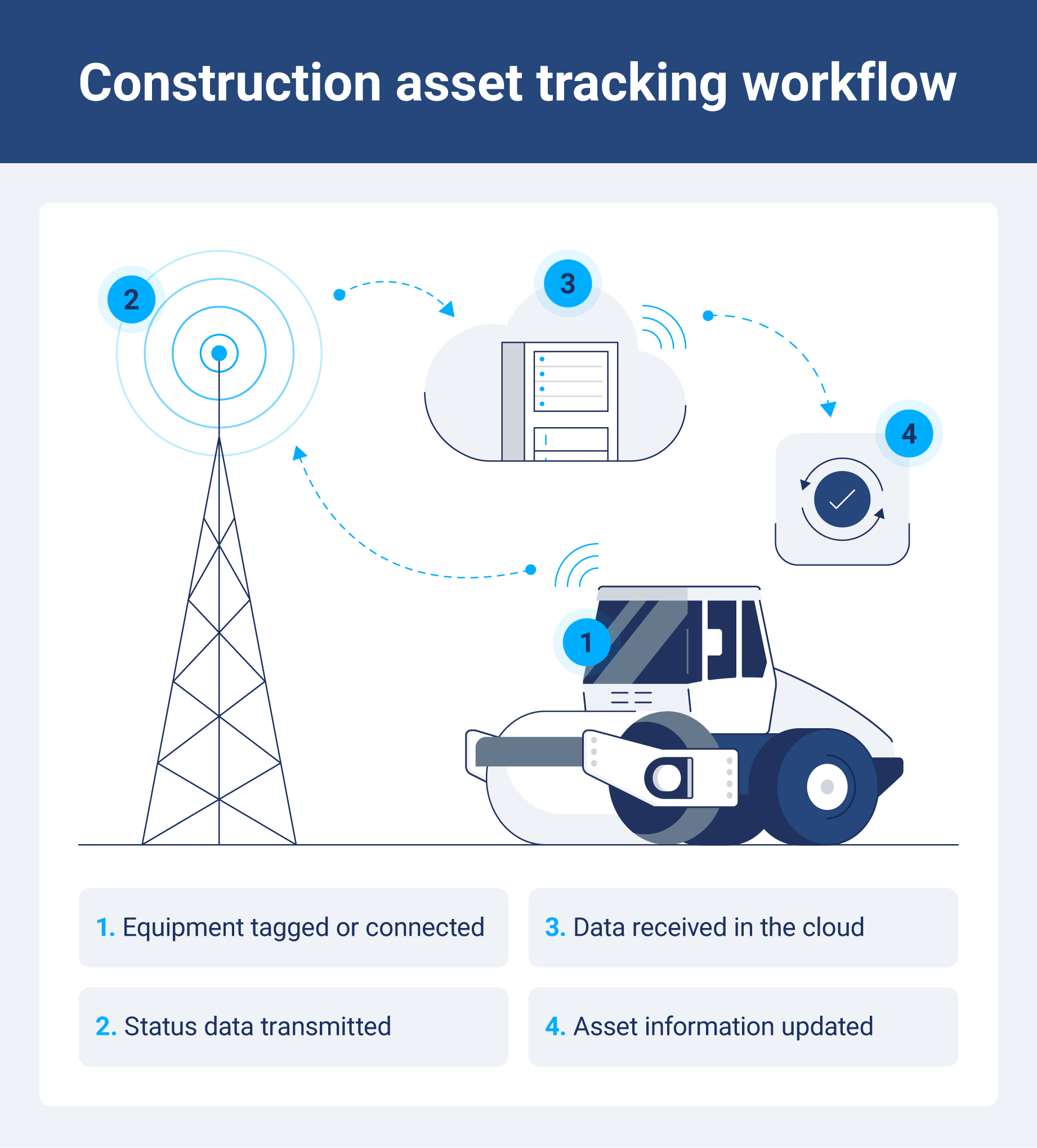
Using construction asset tracking is straightforward: a device or tag is attached to an asset. It transmits location or status data to a centralized software dashboard.
Here is how each core technology works in practice.
GPS tracking
GPS trackers send real-time location data via cellular or satellite networks, making them ideal for heavy equipment and fleet vehicles. Geofencing triggers alerts when an asset leaves a defined boundary, which acts as a strong theft deterrent for remote sites.
RFID tracking
RFID readers scan tags to log location or check-in/out status. Passive tags work at short range with no batteries, while active tags offer longer range and are battery-powered.
RFID tracking is best used for:
- Tool cribs
- Equipment yards
- High-volume check-out workflows
QR codes and barcodes
Workers scan a QR code with a mobile device to log a location, condition or assignment. QR codes and barcodes are cost-effective for small tools, consumables and low-value assets, though they require manual scanning, unlike GPS or RFID.
Bluetooth and IoT sensors
Bluetooth Low Energy (BLE) beacons and Internet of Things (IoT) sensors handle short-range tracking and condition monitoring. These tools work best for indoor environments and monitoring equipment temperature or vibration.
Key features to look for in a construction asset tracking system
When evaluating platforms, use this checklist to find the best construction asset tracking system fit for your operation.
Real-time location tracking
Live location data reduces the time crews spend searching for equipment and supports faster deployment decisions across multiple job sites. For fleets moving machinery between locations, this visibility is key to keeping projects on schedule.
Equipment check-in and check-out
Automated check-in and check-out workflows create accountability and a clear chain of custody. This is especially important for tools and equipment shared across crews or shifts. When something goes missing, you can trace exactly who had it last.
Maintenance scheduling and alerts
Systems that trigger reminders based on engine hours or usage cycles help teams stay ahead of breakdowns rather than reacting to them. Planned maintenance is almost always cheaper than emergency repairs and unplanned downtime.
Geofencing and theft alerts
Geofences let you define an approved boundary for each asset. When equipment moves outside that boundary, be that after hours or to an unauthorized area, you get an immediate alert. This is one of the most practical theft deterrents for remote job sites.
Reporting and utilization data
Understanding heavy equipment asset management means knowing which machines are working and which are sitting idle. Utilization reports help managers avoid unnecessary rentals so they can right-size their fleets.
Mobile app access
Field crews need to log assets, report damage and check equipment in and out without returning to an office or desktop. A strong mobile app is not just a nice-to-have. It often determines if your team actually uses the system.
Integration with project management and ERP software
Connecting asset data with broader construction asset management software eliminates duplicate data entry and gives project managers a single source of truth. The fewer systems your team has to update, the more accurate your records are.
How to choose the right construction asset tracking platform
The right platform depends on your fleet size, asset mix and field workflows. Carefully review these five factors before making a commitment.
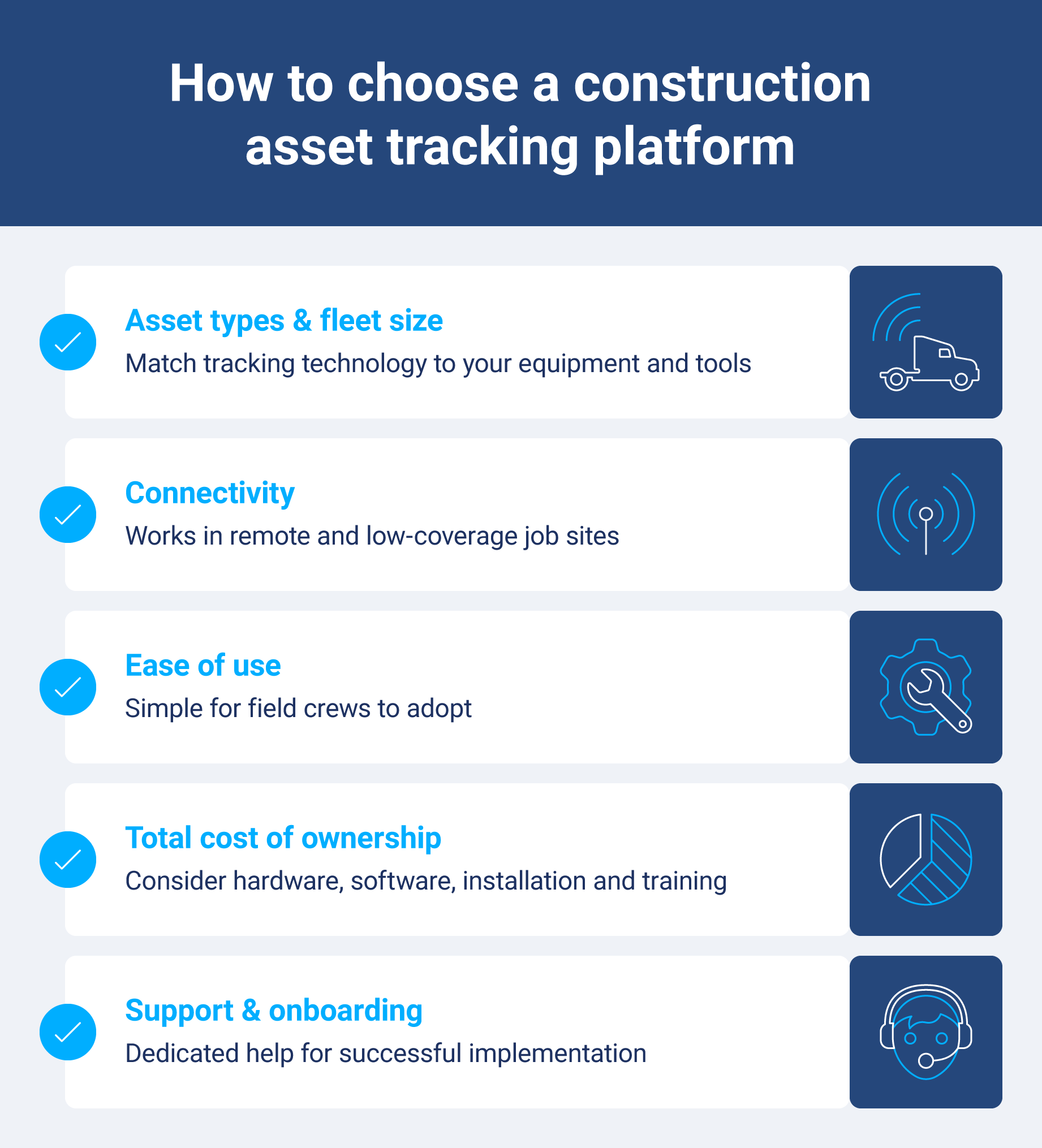
Asset types and fleet size
A fleet built around large equipment like excavators and cranes has different needs than one where hand tools and powered equipment are the priority. Your asset mix affects both the tracking technology you need and the justifiable per-asset cost. Start by categorizing your fleet before evaluating any platform.
Connectivity in low-coverage areas
Cellular dead zones are common for remote construction sites like tunnels or underground. To maintain reliable tracking in those environments, you need a platform that offers satellite GPS backup or offline data logging that syncs automatically when connectivity returns.
Ease of use for field crews
Adoption is the number one failure point for tracking rollouts. If the mobile app requires too many steps or feels unfamiliar, crews will find workarounds, and your data will suffer for it. Easy deployment and a clean, intuitive interface are just as important as any technology feature.
Total cost of ownership
The headline subscription price is rarely the full picture. Make sure you also account for:
- Hardware costs per asset
- Monthly software fees
- Installation
- Training time
For large fleets, those numbers add up quickly. Get a full cost breakdown from vendors before comparing options.
Customer support and onboarding
Larger fleets moving from manual tracking to a digital system need more than a help center article. Make sure to ask vendors about:
- Onboarding support
- Dedicated account management
- Response times
The quality of implementation support often determines if a rollout succeeds or stalls.
Top construction asset tracking platforms
The table below gives an overview of leading platforms. Geotab serves as the reference platform for this article, but the right choice depends on your specific fleet needs.
| Platform | Key features |
| Geotab |
|
| Tenna |
|
| Trackunit |
|
| Samsara |
|
| Verizon Connect |
|
| Clue |
|
| Teletrac Navman |
|
Geotab
Geotab is an open platform fleet and asset tracking solution. It provides the GO Anywhere asset tracker, designed for construction, utilities and transport fleets. Geotab's asset tracker combines real-time visibility, connected systems and third-party tools to help fleets locate assets faster, integrate data across platforms and make more informed decisions.
Tenna
Tenna is made for construction mixed fleets, helping teams improve visibility and control over field assets. Its support equipment assignment tracking, jobsite coordination and preventive maintenance planning.
Trackunit
Trackunit is a platform focused on construction equipment connectivity across multiple manufacturers. Users know it for its downtime analytics, equipment connectivity across OEMs and service event tracking.
Samsara
Samsara is a connected operations platform with real-time data and video telematics. It also provides downtime analytics, equipment connectivity across OEMs and service event tracking.
Verizon Connect
Verizon Connect is a scalable fleet management platform with broad hardware compatibility. Users appreciate its ability to automate dispatch updates, monitor fuel consumption and manage driver activity logs.
Clue
Clue is a unified construction operations platform combining asset tracking with dispatch and maintenance. Teams can schedule equipment across projects, coordinate field operations and track asset allocation in real time.
Teletrac Navman
Teletrac Navman is a fleet tracking platform with strong compliance and workflow management features. Notable strengths are its ability to monitor driver behavior events, generate compliance reports and review route efficiency data.
How to implement construction asset tracking in your business
Getting started with construction asset tracking can feel overwhelming. Follow these seven steps to move from manual tracking to a fully operational system.
Step 1: Audit your current assets
To start, list all equipment, note the current location and assign unique IDs. A spreadsheet or existing ERP data works fine for this. Knowing what you own is the foundation for everything else.
Step 2: Define what you need to track and why
Prioritize your assets by value and theft risk. Excavators justify GPS investment, while hand tools are better suited for passive RFID or QR codes. Trying to track everything the same way is a common and costly mistake.
Step 3: Choose your technology and platform
Review the decision factors in the previous section and run a pilot with a small asset group before committing to a full rollout. Make sure to research what construction asset tracking software best fits your organization.
Step 4: Tag and register your assets
Attach trackers or tags to each asset, register them in the platform and assign them to active projects. Budget time for this step since it usually takes longer than most expect.
Step 5: Train your team
Cover check-in and check-out processes, damage reporting and how to use the mobile app. Adoption is the most common failure point. A tracking system no one uses delivers no value.
Step 6: Set up alerts and reporting
Configure geofence alerts and maintenance reminders on day one to deliver immediate value and build crew confidence in your new system.
Step 7: Review and adjust
Schedule monthly reviews for the first quarter. Use them to catch tracking gaps, refine alert thresholds and address adoption gaps before they become habits.
Common challenges and how to handle them
Use this breakdown as a troubleshooting guide if you run into obstacles after rollout.
Poor cellular coverage on remote job sites
Use satellite-enabled trackers, devices with offline data logging or Bluetooth mesh networks for indoor or underground sites. Do not assume you have cellular coverage until you have done on-site testing.
Low team adoption
Explain the purpose upfront and involve site supervisors in the rollout. The more crews understand how tracking benefits them by reducing disputes over lost tools and improving job assignment clarity, the more likely they are to use the system consistently.
Tracking assets across multiple job sites
Use geofencing by site, maintain transfer logs in the software and assign site managers as asset owners. Clear ownership reduces confusion when equipment moves between locations.
Managing rented equipment alongside owned assets
Managing ghost assets, or equipment that appears in your system but is no longer active or on site, is a real problem when rentals enter and leave your fleet. Use temporary GPS trackers or QR code check-in/out for rentals and integrate that data into your main platform to maintain accurate records.
Build a smarter and more accountable construction fleet
An effective construction asset strategy gives your team real-time visibility, reduces equipment loss and keeps projects on schedule. No matter if you manage a handful of vehicles or a large-scale mixed fleet, Geotab's construction fleet solutions are built to scale with your operation.
See how Geotab's tool connects GPS data, telematics and third-party tools to improve organization-wide visibility.
Subscribe to get industry tips and insights
Frequently Asked Questions
Construction asset tracking is the use of GPS, RFID, QR codes and software to monitor the location, condition and use of equipment tools across job sites in real time.
You can prevent equipment theft on remote job sites by using GPS trackers with geofencing alerts, setting after-hours movement notifications, considering asset immobilizers for high-value machines and posting visible tracking signage on equipment.
Yes, you can track equipment from multiple manufacturers on a single platform. Most modern platforms like Geotab support mixed fleets through universal telematics hardware and open platform APIs.
Asset tracking reduces maintenance costs with usage-based scheduling triggers based on engine hours or usage cycles. This prevents over-servicing and breakdowns from missed intervals.
The typical return on investment for a construction asset tracking system is driven by reduced theft losses, lower rental spend and fewer hours wasted looking for assets. Previous studies have shown that 47% of fleets achieved a positive ROI from GPS tracking within six months.
You can track assets in areas with poor cellular coverage by looking for satellite GPS trackers or devices with offline data logging. These tools can sync data once connectivity returns.
Yes, you do need different tracking technology for small tools versus heavy equipment. Large equipment justifies GPS given its value and theft risk, while passive RFID or QR codes work better for small tools.
The Geotab Team write about company news.
Table of Contents
- Why construction asset tracking matters
- Types of construction assets you can track
- How construction asset tracking works
- Key features to look for in a construction asset tracking system
- How to choose the right construction asset tracking platform
- Top construction asset tracking platforms
- How to implement construction asset tracking in your business
- Common challenges and how to handle them
- Build a smarter and more accountable construction fleet
Subscribe to get industry tips and insights
Related posts

Unlocking more jobs per day: How smart dispatch management improves tech performance
October 13, 2026
3 minute read
Best construction fleet management software: Features, platforms and buying tips
September 9, 2026
7 minute read
Five data-driven strategies to optimize your utility fleet management
August 17, 2026
4 minute read

The architecture gap behind Europe's vehicle theft crisis
August 14, 2026
2 minute read
Beyond location: How asset trackers measure equipment utilization
August 4, 2026
3 minute read