IFTA reporting: Guide and requirements for ELD compliance
Electronic logging devices (ELDs) can also support automated IFTA fuel tax reporting. Does your ELD comply with IFTA? Read this post to find out more.

By Geotab Team
Mar 23, 2026

Key Insights
- IFTA reporting is a quarterly fuel tax compliance requirement for fleets operating across two or more IFTA member jurisdictions.
- Electronic logging devices (ELDs) automate IFTA fuel tax by collecting jurisdiction-level mileage and fuel data, reducing audit risk and completely eliminating manual entry.
- Accurate IFTA reports need data on miles traveled by jurisdiction, fuel purchased, tax-paid gallons and MPG numbers.
- Late filing penalties start at whichever is greater: $50 or 10% of net tax liability.
Every minute your driver spends tracking miles or fuel by hand is a minute they are not driving. IFTA reporting is a must-have for any fleet crossing state lines in the U.S. and Canada, but the way fleet managers handle the International Fuel Tax Agreement (IFTA) requirements can either drain your resources or make you more efficient.
Electronic logging devices (ELDs) make IFTA much simpler. ELDs automatically collect and report miles and fuel used across jurisdictions, making it easier to avoid fines and keep track of data. This guide walks you through exactly what IFTA reporting is, who needs to file, how to compile regular reports and how using ELD technology can help.
What is IFTA reporting?
IFTA reporting is how qualified motor carriers file quarterly fuel tax returns with their base jurisdiction. Basically, it is how fleet managers keep track of miles traveled and fuel purchased across all IFTA member jurisdictions.
The International Fuel Tax Agreement was made to reduce fleet paperwork for interstate fleets by allowing them to file a single quarterly report instead of requiring individual returns for each state or province. Before IFTA, interstate truckers had to carry "bingo plates" displaying each state's permit sticker, making compliance much more complicated.
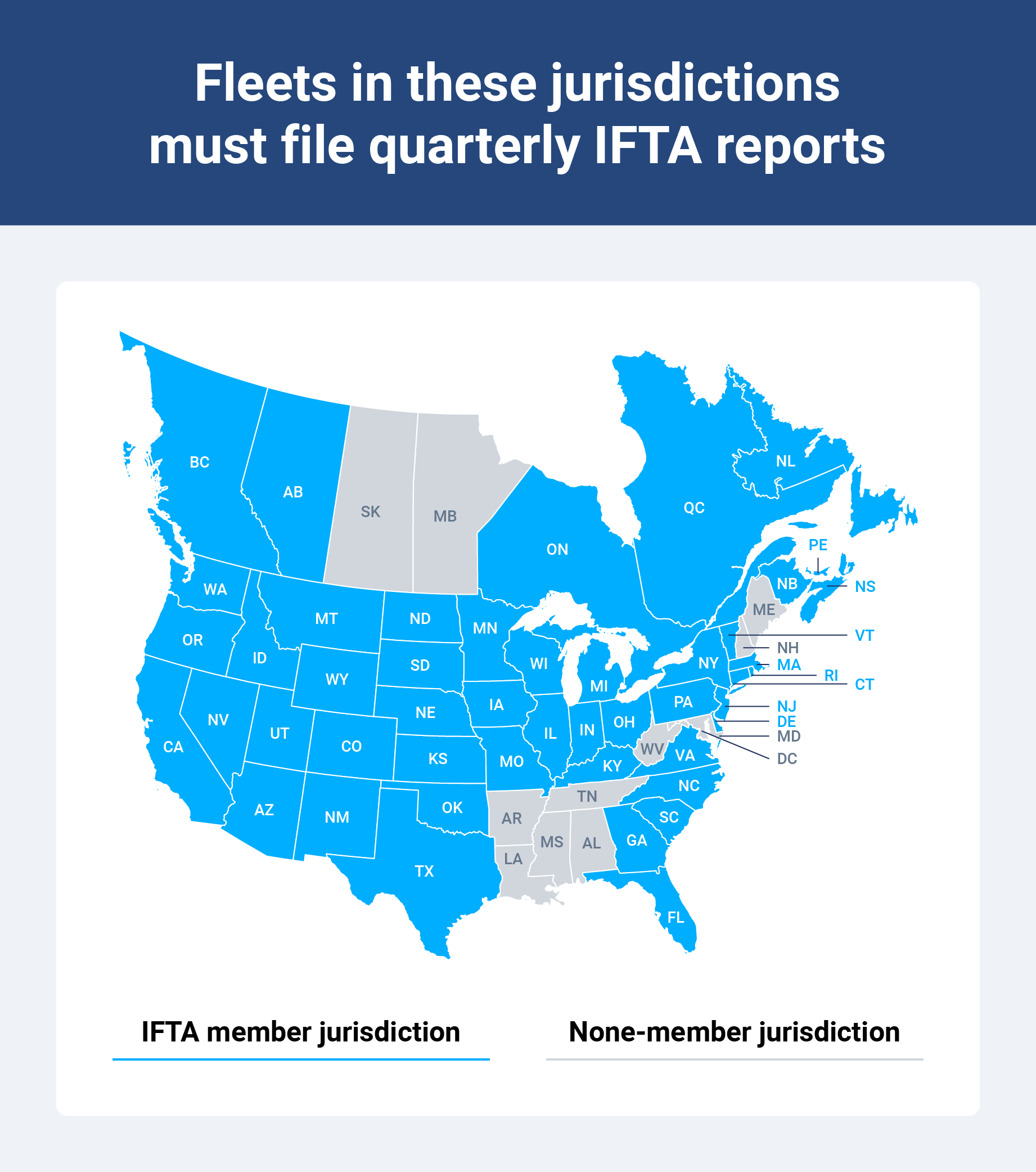
With the current IFTA fuel tax reporting system, carriers pay fuel taxes at the pump, then file quarterly reports that calculate net tax liability or credits based on miles traveled versus fuel purchased in each jurisdiction.
IFTA fuel reporting is usually done quarterly, with reports due on the last day of the month following the end of each quarter. If the due date falls on a weekend or legal holiday, the deadline extends to the next business day. Reports have to include these data points to help determine tax credits or liabilities:
- Jurisdiction-level miles traveled
- Total fuel purchased
- Tax-paid gallons
- MPG calculations
Here are the IFTA due dates for 2026:
| For the periods of: | Due date: |
January - March 2026 1st Quarter | April 30, 2026 |
April - June 2026 2nd Quarter | July 31, 2026 |
July - September 2026 3rd Quarter | November 2, 2026 |
October - December 2027 4th Quarter | February 1, 2027 |
Who needs to file IFTA reports?
Any fleet with qualified motor vehicles that operate across two or more IFTA member jurisdictions must file IFTA reports. This applies to qualified motor vehicles over 26,000 used for transporting goods or passengers for commercial purposes like trucking companies, logistic providers and commercial fleets.
Some vehicles are considered exempt from IFTA. These include:
- Private passenger vehicles
- Recreational vehicles not for business
- Vehicles operating exclusively within a single jurisdiction
Qualified vehicles
A qualified motor vehicle is considered a vehicle that meets one of these specific criteria:
- Vehicle with gross vehicle weight rating (GVWR) greater than 26,000 pounds
- Vehicle with three or more axles, regardless of weight
- Vehicles used in combination exceeding 26,000 pounds
These vehicles must be used for transporting goods or passengers commercially across jurisdiction lines, which is why private passenger vehicles or recreational vehicles not for business are exempt.
Fleet operators
Fleet managers and compliance officers are usually responsible for IFTA filing. This entails:
- Collecting trip data
- Reconciling fuel receipts
- Calculating jurisdiction-level mileage
- Submitting accurate quarterly reports to the base jurisdiction
It is the company's responsibility to equip personnel with the proper training, tools and resources to maintain IFTA compliance. This includes providing access to ELDs, fuel card integration and reporting and audit software. Fleets often designate a fuel tax administrator or work with a third-party to help manage IFTA compliance.
Registration and decals
To participate in IFTA, carriers have to register with their base jurisdiction. That is either the state or province where the fleet maintains its records and operations. Once registered, the jurisdiction issues a license valid from January 1 through December 31, which includes decals that must be clearly displayed on each qualified vehicle.
IFTA decals cost between $0.50 to $12 or more per vehicle, though this varies depending on the jurisdiction. Most jurisdictions allow a grace period through the end of February for these decals to be affixed to both sides of the vehicle cab. Carriers have to renew their IFTA licenses annually and order additional decals when they add new vehicles to their service.
Components of an IFTA report
A complete IFTA report must document fleet operations and calculate fuel tax liability or credits for each jurisdiction. It should also include:
- Jurisdiction-level miles traveled: This tracks miles driven in each IFTA jurisdiction using odometer data or or GPS telematics that automatically detects border crossings.
- Fuel purchased and consumed: Fleets often use fuel card programs to automatically track fuel purchases by jurisdiction, including number of gallons, purchase location, date and fuel type.
- Tax-paid gallons and MPG calculations: Calculate average miles per gallon (MPG) for the fleet then apply this rate to miles traveled in each jurisdiction to determine fuel consumption and net tax liability.
- Other required supporting documents: Fleets must maintain trip sheets, fuel receipts, odometer and maintenance records, along with proof of any tax-exempt miles or purchases. IFTA jurisdictions audit 3% of organizations annually.
How to Calculate IFTA Tax
Filing quarterly IFTA reports requires collecting data, calculating tax liability and submitting the return to your base jurisdiction, which is a lot of paperwork. Keep in mind that some states offer online-only or mail-only filing.
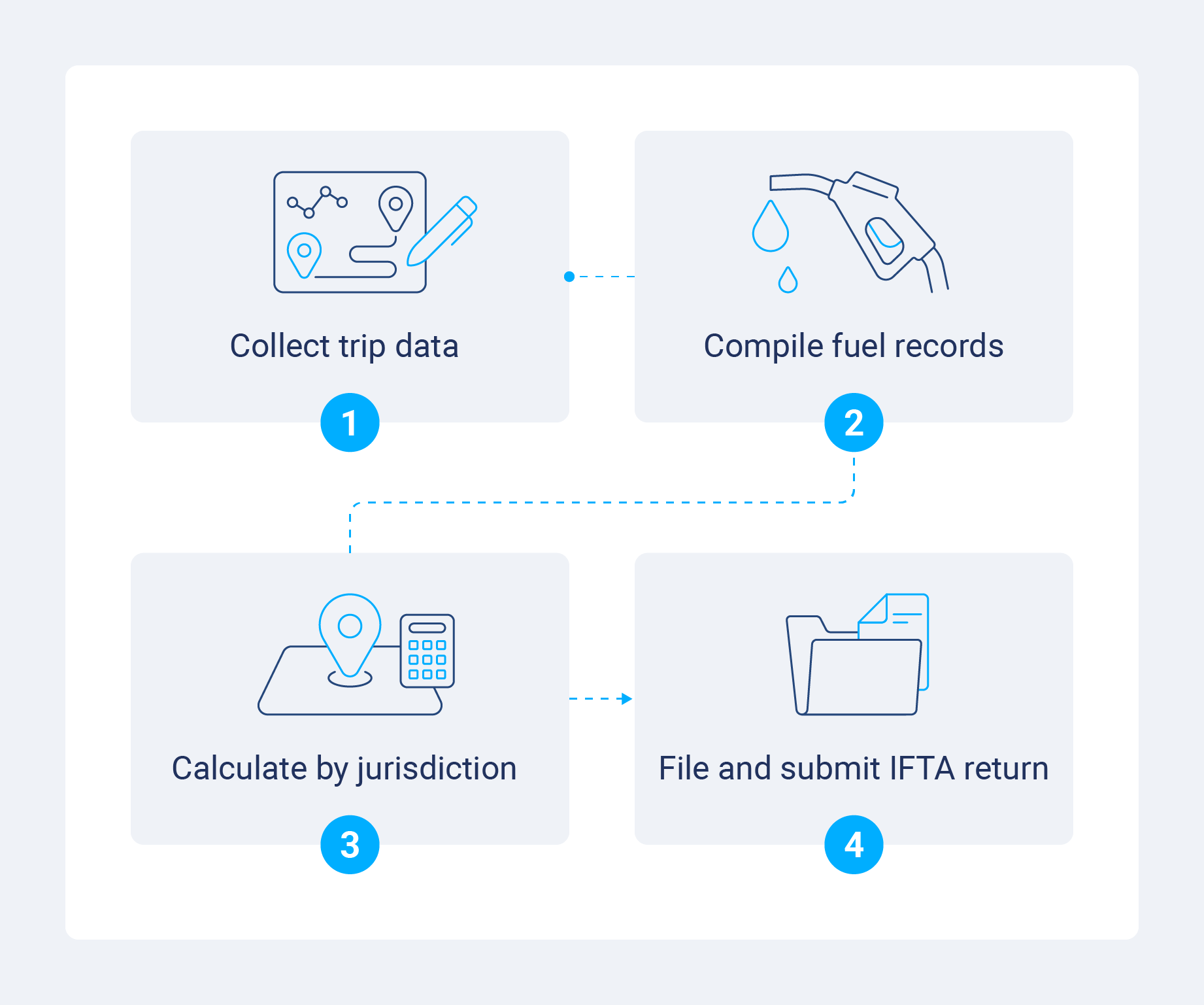
1. Collect and organize trip data
First, you will want to collect all trip records for the reporting quarter. This includes:
- Departure and arrival locations
- Routes traveled
- Odometer readings at jurisdiction points
If you are using manual logs, compile driver trip sheets. For automated systems, export jurisdiction-level mileage reports from your telematics or ELD platform.
2. Compile fuel purchase records
Now you will need to collect all fuel receipts or fuel card transaction reports for the quarter and organize them by jurisdiction. Confirm the purchase includes the:
- Date
- Location (state or province)
- Number of gallons
- Fuel type
- Total cost
3. Calculate mileage and fuel consumption by jurisdiction
Next, enter total miles traveled in each IFTA jurisdiction into your reporting system or spreadsheet. Calculate your fleet's average MPG by dividing total miles by total gallons consumed, and apply that rate to miles traveled in each jurisdiction to determine tax-owed gallons. Compare that against tax-paid gallons to determine net tax liability or credit.
4. Complete and submit the IFTA tax return
Fill out your base jurisdiction's IFTA tax return form with that calculated data. Make sure to include:
- Total miles
- Taxable miles
- Gallons purchased
- Gallons consumed
- Net tax amounts for each jurisdiction
Submit the completed return with payment (if you owe taxes) by the quarterly deadline.
Most states provide fillable PDF forms or online filing portals, though some have specific restrictions:
| Online only | By mail only |
| Illinois | New Mexico |
| Kentucky | Pennsylvania |
| Michigan | Rhode Island |
| Mississippi | South Carolina |
| California | Utah |
| Vermont | |
| West Virginia |
How to leverage ELD Devices for IFTA Reporting
Since all IFTA fleets will also be using electronic logging devices (ELD) for Hours of Service compliance, they should leverage their ELDs for automating IFTA reporting.
Benefits of automating IFTA Fuel Tax reporting include:
- Automatically calculating distance traveled by jurisdiction for each vehicle.
- Eliminated manual entry.
- Reduced audit risk by removing inconsistencies.
- Reduced fleet management processing time
- Increased driver productivity.
- Easily importing fuel card data, rather than calculate manually based on receipts.
Collect data automatically
ELDs use GPS to automatically calculate miles driven in each jurisdiction, logging entry and exit points at state and provincial lines. This means drivers do not have to manually record odometer readings at every border crossing, improving accuracy and driver efficiency.
Generate reports with telematics
MyGeotab produces jurisdiction-level distance reports, origin and destination details and comprehensive trip summaries that can be directly used for IFTA filing. The platform aggregates data across your entire fleet, calculating total miles by jurisdiction and providing exportable data compatible with IFTA reporting requirements.
Telematics integration takes automated fuel data importing a step further, importing numbers from fuel card providers and automatically matching fuel purchases to vehicle trips and jurisdictions. This closed-loop system makes accurate and complete reporting dramatically easier, while also cutting back on administrative time.
Protect against compliance issues
IFTA jurisdictions audit 3% of fleets annually, so carriers must maintain detailed reports to support their quarterly filing. Electronic logs reduce inconsistencies and provide auditors with clear, defensible documents. Telematics systems store records for usually four plus years, automatically satisfying IFTA data retention requirements.
Additional considerations for IFTA compliance
You likely understand by now that manual and automated IFTA reporting are very different.
Manual reporting requires:
- Drivers recording odometer values at border crossings for all trips
- Company personnel gathering trip data from drivers and aggregating data
- Gathering and totaling fuel receipts
- Fuel manager analyzing the reported trip data and fuel receipts, recording the data for each jurisdiction
- Company personnel filling out and filing the necessary tax forms for the base jurisdiction
Automated IFTA reporting with a tool like MyGeotab, on the other hand, saves time and mileage, and looks something like this:
- Telematics device logs vehicle odometer and GPS position at a high resolution, accurately capturing each vehicle’s daily trips.
- MyGeotab calculates entry and exit odometers. MyGeotab also helps to identify any vehicle or device issues to bring to the attention of the auditor.
- MyGeotab’s automated fuel card import automatically matches fuel purchases to trips and jurisdictions for faster and more accurate reporting.
- Automated IFTA reports can be sent to Geotab partners to automate populating tax forms.
Manual reporting can also make it harder to keep cleaner data since fleet managers have to track down and retain all fuel receipts, reconcile them against fuel card statements regularly and review and correct any odometer discrepancies immediately.
The penalty for non-compliance is steep: missing an IFTA due date results in an immediate $50 or 10% of your net tax liability fine. You will have to pay whichever is greater. Interest accrues monthly, and if taxes are more than 30 days past due, carriers risk losing their IFTA license entirely.
Take control of your IFTA reporting with Geotab
IFTA reporting does not have to be a quarterly nightmare for your fleet. Using ELD technology and telematics platforms like MyGeotab means fleet managers can transform IFTA compliance from a manual, time-consuming and error-prone process into an automated, accurate and efficient operation.
As your fleet grows and expands into new jurisdictions, scalable IFTA solutions become even more critical for maintaining operational efficiency. Implementing the compliance software protects your bottom line and keeps your vehicles on the road.
While Geotab recognizes our place as a self-registered ELD manufacturer and provider and we will answer questions regarding those Hours of Service (HOS) ruleset options we provide, neither Geotab nor any of its employees, officers or agents can offer legal advice to any resellers or customers concerning which HOS ruleset(s) or exemption(s) may apply to any particular situation. Please contact your local DOT department or refer to the FMCSA website at https://www.fmcsa.dot.gov/ for questions Geotab is unable to answer.
Subscribe to get industry tips and insights
Frequently Asked Questions
IFTA quarterly reports are due on the last day of the month following the end of each quarter. If the due date falls on a weekend or legal holiday, the deadline is extended to the next business day.
IFTA decals expire on December 31 of each year and must be renewed annually. New decals for the following year must be displayed on qualified vehicles by the end of February, though most jurisdictions allow displays starting December 1 of the preceding year.
Vehicles qualify for IFTA if they travel interstate across two or more IFTA jurisdictions for commercial purposes and meet one of the following criteria:
- Have two axles and a gross vehicle weight exceeding 26,000 pounds
- Have three or more axles regardless of weight
- Are used in combination where the combined weight exceeds 26,000 pounds
Fleets must file IFTA reports quarterly, or four times per year.
If you discover errors after filing, you must submit an amended IFTA return to your base jurisdiction. There is generally a multi-year window to submit amendments, but you should still do so as soon as possible to avoid penalties and interest on any additional taxes owed.
Automated IFTA reporting requires an ELD with IFTA reporting capabilities or telematics platform that tracks GPS location and mileage by jurisdiction. Geotab simplifies this process by automatically capturing jurisdiction-level miles and generating reports ready for IFTA filing.
The best IFTA reporting software is Geotab's MyGeotab platform. It seamlessly integrates with your existing ELD and telematics systems, providing accurate jurisdiction-level mileage tracking, supporting fuel card data import and generating reports in your base jurisdiction's required format.
The Geotab Team write about company news.
Table of Contents
Subscribe to get industry tips and insights
Related posts

6 benefits of an open, AI-powered fleet data platform
September 17, 2026
8 minute read

Before the storm call: Five ways to know your utility fleet is ready
August 6, 2026
3 minute read

Beyond consumer apps: 5 ways integrated navigation protects your fleet
July 23, 2026
6 minute read

Closing blind spots in cargo security with a 360 fleet camera system
July 22, 2026
3 minute read

Top 7 transportation management systems (TMS) for small carriers
July 16, 2026
9 minute read

10 best ELD for hotshot truckers to stay compliant and profitable
July 6, 2026
9 minute read