Fleet maintenance software for small business: 8 top tools and guide
Compare eight fleet maintenance software platforms for small businesses. Use this guide to review standout features and pricing signals and find a practical framework for picking the best fit.

By Geotab Team
Sep 29, 2026

Key Insights
- The right fleet maintenance software for a small business should help control repair costs, reduce unplanned downtime and replace manual tracking methods.
- Types of platforms range from fully connected fleet systems to focused maintenance tools.
- When comparing fleet maintenance tracking software, prioritize features like automated scheduling, digital inspections, work order management and cost reporting.
- Look for software that scales with your fleet to avoid a costly switch as the fleet grows.
Many small fleets use spreadsheets, calendar reminders, paper logs or driver-reporting issues to track vehicle maintenance. These manual methods can make it easy to miss service intervals or lose track of repair histories, potentially leading to unexpected repairs or vehicle downtime. Fleet maintenance software for small businesses replaces this approach with a centralized system that keeps all data in one place.
This guide compares eight vehicle fleet maintenance software options. Each choice works well for small fleets with limited staff, time and budget. Learn the key features and selection criteria for small businesses before choosing the right fit for your business.
1. Geotab
Keeping a small fleet on the road means staying ahead of maintenance without adding another task to an already busy day.
Geotab helps small businesses manage maintenance with vehicle data collected through connected fleet platforms. Fleet managers can find maintenance reminders, fault-code visibility, digital vehicle inspections, odometer and engine-hour tracking and Marketplace integrations in one place.
.jpg)
For fleets outgrowing scheduled services, Geotab supports predictive maintenance tools that flag issues before they become serious.
Since Geotab allows maintenance data to live alongside fuel, utilization, routing and driver information, small businesses can measure how vehicle upkeep impacts their larger operations. Maintenance does not need to be managed as a separate task.
Key features
- Automated maintenance reminders based on mileage, engine hours or time intervals
- Work order management to track completed service, requests and approvals
- Maintenance and parts reporting to identify trends and monitor repair spending
- Remove diagnostics that surface active fault codes and prioritize needed repairs
2. Fleetio
Fleetio appeals to small and mid-sized fleets looking for dedicated maintenance software without the learning curve of a full telematics platform. The platform offers predictive maintenance schedules, digital service histories, work orders, parts and inventory management and inspections, giving complete maintenance records without paper files.
.jpg)
Small businesses often choose Fleetio if they need strong maintenance management but are not looking for wider fleet tracking. Fleets that also want GPS tracking, fuel management or driver monitoring will need to consider a different platform or pair Fleetio with a broader tool.
Key features
- Fleet-wide maintenance cost reporting
- Work order creation with parts and inventory tracking
- Preventive maintenance schedules based on mileage, engine hours or date
- Digital vehicle service histories accessible from any device
3. AUTOsist
AUTOsist can be a good, lightweight fit for small businesses looking for an easy first step toward moving away from paper records or spreadsheets. It offers service reminders, digital maintenance records, inspections, fuel tracking and mobile access.
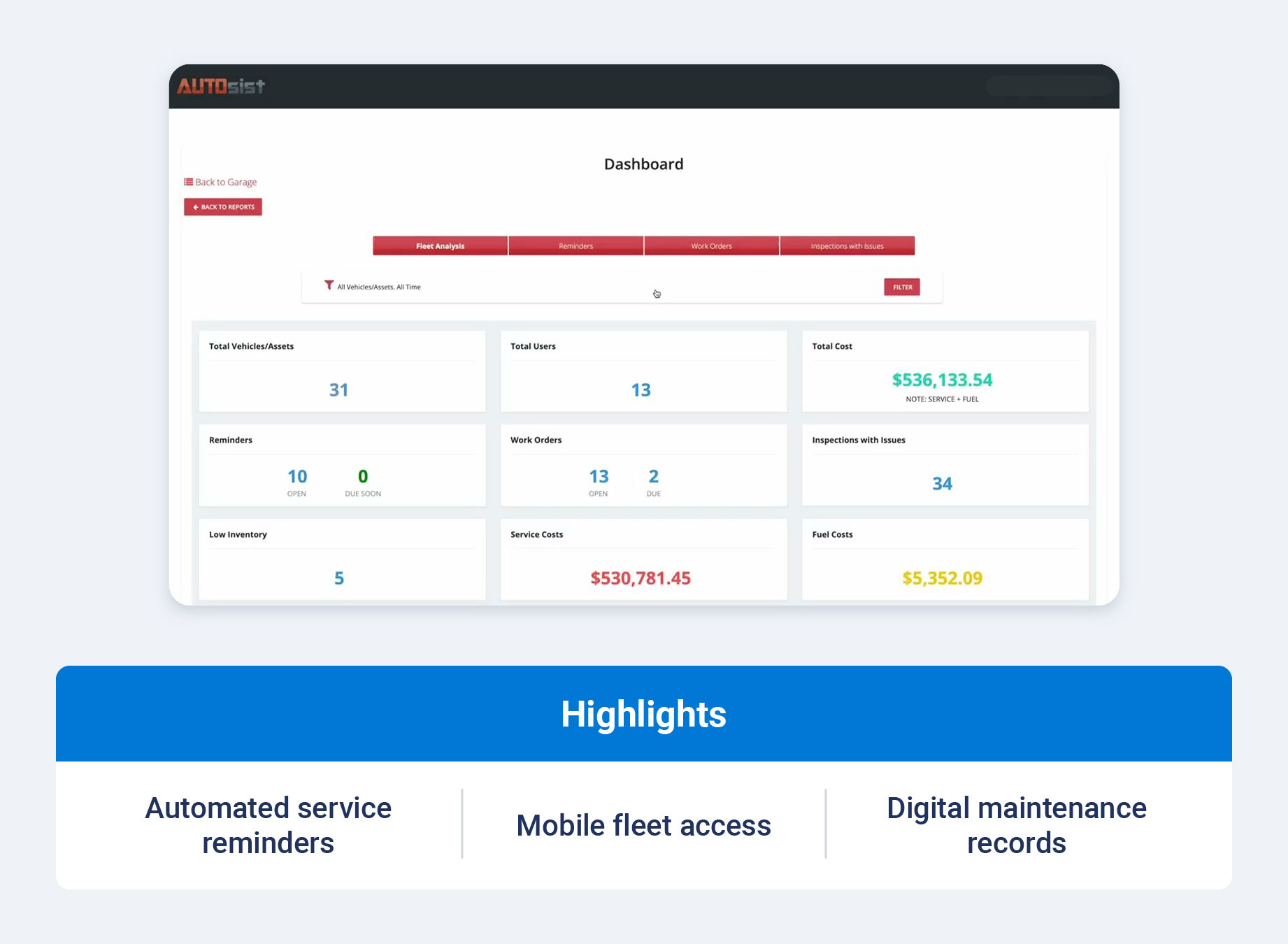
The platform keeps its features intentionally simple, making it an approachable option for teams without dedicated maintenance staff, though fleets with more complex service workflows may eventually need deeper reporting.
Key features
- Digital inspections and maintenance logs
- Automated service reminders by date or mileage
- Mobile app access for managers and drivers
- Fuel tracking included in maintenance records
4. Whip Around
From the initial vehicle inspection to the resulting repair, Whip Around keeps key maintenance tasks connected in one workflow. Drivers can complete inspections from its mobile app and then report defects directly into a work order for a shop or mechanic. The platform also supports digital inspections, maintenance workflows and defect reporting.
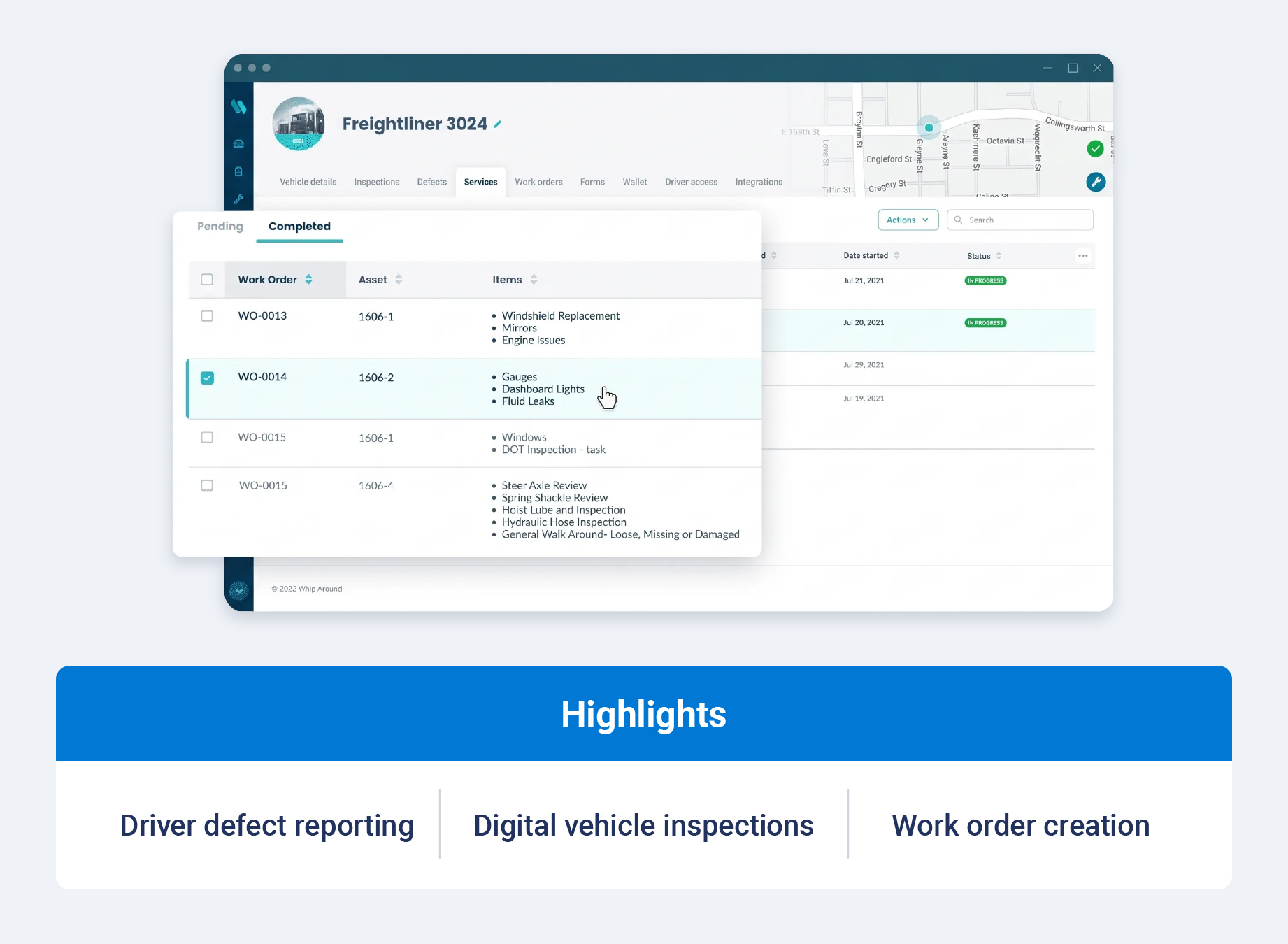
By involving drivers in inspection and defect reporting, Whip Around helps small businesses identify vehicle issues before scheduling maintenance appointments and route them to the appropriate person for follow-up.
Key features
- Vehicle-specific maintenance and inspection history
- Preventive maintenance scheduling
- Customizable digital vehicle inspection reports
- Defect reporting that can convert directly to work orders
5. Coast
Coast combines fuel cards, maintenance tracking, spending controls and expense visibility. Its maintenance capabilities are positioned alongside broader fuel and expense management tools, making it an option for businesses that want to manage vehicle-related spending in one platform.
.jpg)
Businesses that need in-depth diagnostics, telematics-based tracking or inspection workflows should treat Coast as a complement to dedicated fleet maintenance management software, not a full replacement. Coast focuses on fuel management and fleet payment offers, so businesses that need deeper vehicle oversight may still need a dedicated platform.
Key features
- Vehicle- and driver-specific expense and report tracking
- Maintenance reminders linked to vehicle records
- Repair and service cost visibility
- Fuel card spending controls
For businesses that want maintenance data alongside other fleet operations, a connected platform can bring more of those functions into one system.
Samsara provides vehicle diagnostics, preventive maintenance schedules and fault alerts. It combines this offer with a broader connected-fleet platform that also includes GPS tracking, compliance tools and dash cams.
.jpg)
Samsara's pricing is quote-based, while its broader platform typically requires more implementation setup than a standalone maintenance tool. Smaller fleets should consider this carefully and measure the true value of the full platform against a more focused solution.
Key features
- Preventive maintenance scheduling
- Maintenance cost and downtime reporting
- Fault code alerts and vehicle diagnostics
- Integration with safety tools and GPS tracking
7. MaintainX
MaintainX stands out from the other vehicle-specific platforms on this list by managing maintenance across multiple asset types, from facilities to equipment. It supports preventive maintenance schedules, procedures, inspections, work orders and team collaboration.
.jpg)
MaintainX can be a good fit for small businesses that maintain vehicles and other physical assets. It works well for those who want to use one system for all maintenance work instead of a tool focused exclusively on fleet vehicles.
However, businesses primarily focused on fleet maintenance may find its broader asset-management approach less specialized than a dedicated fleet platform.
Key features
- Digital checklists and inspections
- Preventive maintenance procedures and scheduling
- Work order management across vehicles and other assets
- Team communication and collaboration tools
8. Simply Fleet
Simply Fleet offers a straightforward package that can work well for very small fleets. It focuses on the essentials of maintenance tracking instead of advanced diagnostics reporting, offering service reminders, mileage tracking, expenses, fuel records and driver access.
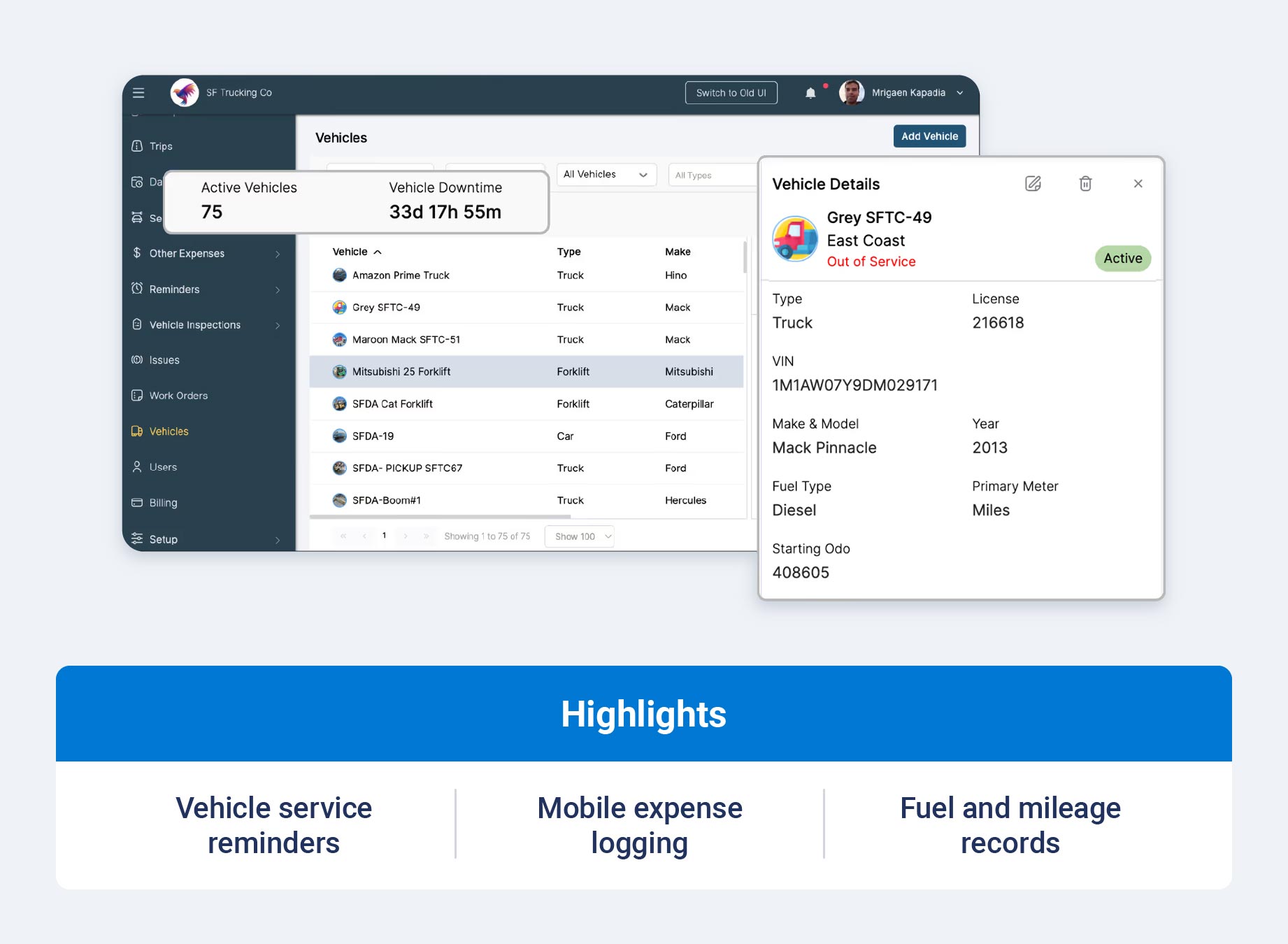
For businesses with only a few vehicles looking to move off a spreadsheet while avoiding a complex implementation, Simply Fleet offers an easy starting point.
Key features
- Driver access through mobile app
- Expense logging by vehicle
- Fuel record and mileage tracking
- Service and maintenance reminders
Key features to look for in fleet maintenance software
Though the tools above overlap in core capabilities, not all small businesses have the same needs. Focus on the capabilities that remove manual work and provide the information fleet managers and owner-operators need to act on.
Automated preventive maintenance scheduling
Automated scheduling tracks engine hours, mileage or calendar intervals. It uses that data to flag services before they become overdue. This removes the need to manually track when each vehicle is due for inspections, tire rotations or oil changes.
Service reminders and notifications
Reminders keep maintenance top of mind for drivers and managers by sending out email, text or app notification updates. Automated reminders lower the chance that someone forgets to schedule a much-needed service.
Digital inspections and defect reporting
Digital inspections allow drivers to complete pre- and post-trip checks from a mobile device and can flag defects immediately. Any reported issues route directly into a work order, making it easier for technicians to track a problem from the driver's initial report through resolution.
Work orders and service histories
A centralized work order system keeps track of repairs from request to completion. A digital service history, in comparison, keeps a complete record for every vehicle. This data is especially helpful during safety audits or when choosing between repairing and replacing a vehicle.
Vehicle diagnostics and fault-code alerts
Some platforms use vehicle maintenance software to connect to a vehicle's onboard diagnostics, to surface fault codes and prioritize which issues need attention. This shifts maintenance from a fixed schedule to a more accurate picture of the vehicle's actual condition.
Maintenance cost reporting
Cost reports break down spending according to repair type, time period or vehicle. Managers can use this information to identify vehicles with unusually high maintenance costs, compare repair spending over time and improve maintenance budgets.
When repair costs consistently approach the value of the vehicle, those records can also inform decisions about whether it is worth continuing repair or investing in a replacement.
Mobile access and integrations
Mobile access allows managers and drivers to use software from anywhere in the field instead of staying at a desktop. Integrations with fuel cards, dispatch tools or accounts reduce errors and duplicate data entry and keep maintenance information connected to the rest of the business.
How to choose fleet maintenance software for a small fleet
To choose the right fleet maintenance software for a small fleet, managers must first consider their daily workflows and current challenges. Use the following criteria to narrow down options.
Identify your maintenance priorities
First, identify what your fleet's largest expense is. Consider unplanned breakdowns, missed inspections or unclear repair costs. A platform that can help target your biggest pain point will deliver faster value than one loaded with every available feature.
Consider fleet size and future growth
A platform that fits three vehicles today might not be able to scale to fifteen. If your fleet expects to add more drivers or vehicles over the next few years, choose a platform that grows with you instead of an option that only fits your current size. The best fleet management software should be able to match you as you scale.
Compare ease of use and implementation
Small businesses rarely have dedicated IT staff, which is why software needs to be intuitive from day one. Look for a straightforward mobile app and a vendor that offers hands-on onboarding support for an easier learning curve and higher adoption rate.
Review integrations and vehicle compatibility
Confirm your chosen software works with your vehicle types, especially if you have a mixed fleet of light-, medium-, or heavy-duty vehicles. Your platform of choice should ideally integrate with the tools you already use, including software or fuel cards.
Calculate the potential return on investment
Weigh the monthly costs of investment against the value of avoided breakdowns, reduced repair bills and time saved on administrative tasks. Even a modest decrease in unplanned downtime can help offset the cost of most small business maintenance platforms.
Request a demo or trial
Test any software with the people who will regularly use it, including drivers and whoever manages your shop relationships. A demo reveals how the platform actually performs, not just what features it offers.
How to get started with fleet maintenance software
A structured rollout can help a small team transition from spreadsheets or paper records without disrupting regular operations. Here is how to get started:
- Gather vehicle, mileage and service-history data for every vehicle in your fleet.
- Define preventive maintenance intervals for each vehicle or asset type.
- Assign responsibility for alerts, inspections and repair approvals.
- Connect available telematics devices and business systems.
- Train drivers and employees on inspection and reporting workflows.
- Monitor overdue services, downtime and maintenance costs.
- Review the program regularly and adjust schedules based on vehicle usage and performance.
Start with your highest-priority vehicles and workflows first. Add advanced functionality once the basics are running smoothly.
Get more from your small-fleet maintenance program
The right fleet maintenance software for a small business helps prevent avoidable downtime, reduce manual work and give you a clearer picture of vehicle costs. Connecting maintenance information with broader fleet data also gives managers a clearer view of vehicle cost and performance.
Explore Geotab's fleet maintenance solution to see how connected diagnostics and maintenance reporting work together.
Subscribe to get industry tips and insights
Frequently Asked Questions
There is no single best fleet maintenance software for a small business. Different organizations have different needs. Fleets that want maintenance data connected to wider vehicle efficiency information often choose a platform like Geotab.
Fleet maintenance software costs usually vary depending on fleet size and features included. Packages can range from basic per-vehicle for simpler operations or quote-based for more complex needs. A demo or quote request is the best way to understand how much you will need to budget.
By shifting fleets from reactive pairs to planned maintenance, fleet maintenance software helps reduce costs. Catching issues earlier helps prevent minor problems from becoming expensive repairs, while automated service reminders help fleets stay on schedule. Clear cost reporting also makes maintenance spending easier to manage.
Fleet management software covers a wider range of functions, including driver behavior monitoring, GPS tracking, routing and compliance. In comparison, fleet maintenance software focuses on just service scheduling, repairs, maintenance costs and inspections. Many fleet management platforms often include maintenance tools, too.
There is no minimum number of vehicles you need to use maintenance software. Even a small fleet with two or three vehicles can benefit from moving off spreadsheets and paper records, since digital records make it easier to track service schedules and spot upcoming maintenance needs before they lead to missed services or unexpected breakdowns.
The Geotab Team write about company news.
Table of Contents
Subscribe to get industry tips and insights
Related posts

Top seven best fleet fuel cards: How to choose the right one for your business?
October 1, 2026
7 minute read

Best software for small trucking companies: 5 tools to streamline your fleet
September 4, 2026
4 minute read
The failure you didn't predict is more than just a repair bill
August 18, 2026
1 minute read