What is g-force? How fleets use g-force data to boost safety
Learn what g-force is and how it is used to monitor risky driving behaviors.

Jun 18, 2026
Key Insights
- G-force tracking helps fleets identify unsafe driving behaviors like harsh braking, rapid acceleration, and aggressive cornering.
- Fleet telematics systems use accelerometers and vehicle data to measure g-force events in real time.
- Monitoring g-force data can improve driver coaching, reduce collision risk, and support fleet safety programs.
- Understanding what g-force is and how it works helps fleets make better operational and safety decisions.
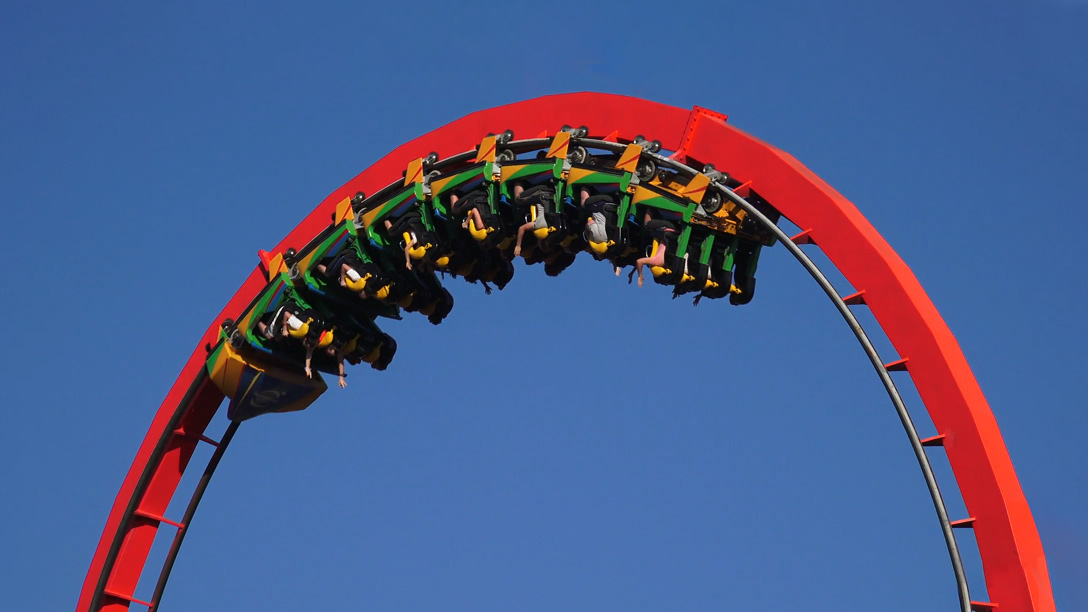
If you’ve ever felt yourself pushed back into your seat during acceleration or pulled forward during sudden braking, you’ve experienced g-force. In fleet management, understanding what g-force is helps organizations measure how vehicles move and how drivers respond behind the wheel.
By tracking these events in real time, fleets can boost driver safety, support coaching programs, investigate incidents more effectively, and gain better visibility into vehicle performance across daily operations.
What is g-force?
G-force, or gravitational force, is a measurement of acceleration relative to Earth’s gravity. One g, commonly written as 1G, represents the normal gravitational force people experience while standing still on Earth. When a vehicle speeds up, slows down, changes direction or experiences an impact, the force acting on it changes.
In fleet environments, g-force helps measure how aggressively a vehicle is being driven and the stress placed on both the vehicle and the driver. Higher g-force readings often indicate more sudden or forceful movements.
For example:
- Sudden harsh braking creates negative g-force as the vehicle rapidly decelerates.
- Rapid acceleration creates positive forward g-force.
- Sharp turns generate lateral g-force from side-to-side motion.
- Impacts and collisions can create extremely high g-force spikes.
These measurements give fleet managers a clearer picture of risky or distracted driving behaviors and vehicle events that may require attention.
How does g-force work?
G-force is created whenever acceleration changes. The laws of physics dictate that force increases with acceleration, meaning more abrupt vehicle movement creates stronger forces on the vehicle and driver.
Fleet telematics systems use sensors to measure movement across multiple directions and convert those changes into trackable data points. Accelerometers inside telematics devices continuously monitor vehicle motion and record when certain thresholds are exceeded.
These systems typically measure movement across three axes:
- Forward and backward movement (longitudinal acceleration)
- Side-to-side movement (lateral acceleration)
- Up-and-down movement (vertical acceleration)
For example, a harsh braking event produces a strong longitudinal force, while aggressive cornering creates a higher lateral force. Together, these measurements help fleets understand how vehicles are being operated in real-world conditions.
Why g-force matters in fleet management
G-force data gives fleets measurable insight into driving behavior and vehicle movement. Instead of relying solely on driver reports or collision claims, fleet managers can use telematics data to identify patterns associated with unsafe driving, operational inefficiencies and safety concerns.
G-force monitoring for events can help fleets:
- Detect unsafe driving behaviors.
- Understand the severity of impacts or collisions.
- Identify trends connected to collisions.
- Support driver coaching initiatives.
- Improve overall fleet safety performance.
This type of monitoring is especially important for industries where vehicles operate in demanding environments or carry valuable cargo. Delivery fleets, construction fleets, oil and gas operations, long-haul trucking companies and public sector fleets often rely on g-force tracking to improve visibility into driver performance and reduce operational risk.
Common g-force events fleets track
Fleet telematics systems monitor a variety of driving events that generate measurable g-force activity. These events often signal aggressive driving, potential safety risks or increased vehicle wear.
Harsh braking
Harsh braking occurs when a vehicle rapidly decelerates, often because of tailgating, distracted driving or sudden traffic changes. Frequent harsh braking events can increase brake wear, reduce tire lifespan and raise collision risk.
Rapid acceleration
Rapid acceleration happens when drivers aggressively increase speed. These events may reduce fuel efficiency, increase drivetrain stress and contribute to unsafe driving conditions in busy traffic environments.
Aggressive cornering
Aggressive cornering creates high lateral g-force as a vehicle turns sharply at higher speeds. This can increase rollover risk for certain vehicle types and create cargo shifting concerns in commercial fleets.
Impacts and collisions
Telematics systems can detect sudden impact forces during accidents or collisions. G-force measurements help fleets assess crash severity, support insurance investigations and more accurately review incident timelines.
Rollover risk events
Vehicles with a higher center of gravity, such as utility trucks and heavy-duty vehicles, may face a greater risk of rollover during aggressive turns or sudden maneuvers. Monitoring g-force activity can help fleets identify situations that increase rollover exposure.
How is g-force measured?
Fleet telematics systems measure g-force using accelerometers and connected vehicle technologies that capture motion data during daily vehicle operation. While g-force describes the physical forces created by acceleration and movement, telematics hardware records and translates those forces into usable fleet data.
Modern fleet systems often combine:
- Accelerometers
- GPS tracking
- Vehicle telematics devices
- AI-powered dash cameras
- Engine and CAN bus integrations
Together, these technologies help fleets monitor driving events, analyze vehicle activity and review safety-related incidents with greater accuracy.
Telematics devices continuously collect motion data throughout a trip. When movement exceeds predefined safety thresholds, the system can automatically log the event, trigger alerts or capture supporting video footage for review. Fleet managers can then access this information through cloud-based dashboards, driver scorecards and reporting tools.
| Technology | Purpose |
| Accelerometer | Detects motion and acceleration |
| GPS | Tracks speed and location |
| Telematics device | Aggregates vehicle data |
| Dash cam | Provides visual event context |
How g-force data appears in fleet management software
Fleet management platforms organize g-force data into dashboards, reports and driver performance tools, making it easier to identify trends and review incidents.
Fleet managers may view:
- Safety dashboards
- Driver scorecards
- Event timelines
- Video-triggered incidents
- Historical trend reports
Many systems also allow organizations to customize event thresholds based on vehicle type, operating conditions or company safety policies. Real-time notifications and automated alerts can help managers respond quickly to high-risk driving events as they occur.
Instead of focusing solely on isolated incidents, fleets can use g-force reporting to identify long-term coaching opportunities and recurring patterns across drivers or routes.
Benefits of tracking g-force data
Tracking g-force data helps fleets move from reactive safety management to proactive risk prevention. By understanding how vehicles are being driven in real time, organizations can make better decisions around safety and operational performance.
- Improved driver safety: Monitoring sudden vehicle movements helps fleets identify risky driving behaviors before they contribute to serious collisions or injuries.
- Better driver coaching: Managers can use g-force events as coaching opportunities to help drivers improve braking, acceleration and cornering habits.
- Reduced collision risk: Identifying patterns tied to unsafe driving may help reduce collisions, rollover incidents and near-miss events.
- Lower fleet maintenance costs: Aggressive driving behaviors can increase wear on brakes, tires, suspension systems and drivetrains. Reducing those behaviors may lower maintenance expenses over time.
- Stronger fleet insurance and claims support: G-force event data provides additional context during collision investigations and insurance claims reviews.
- Increased operational visibility: Fleet managers gain better insight into how vehicles are being operated across routes, drivers and job sites.
How Geotab helps fleets monitor g-force events
Geotab helps fleets monitor g-force events through connected telematics solutions that provide real-time visibility into vehicle movement and driver behavior.
Using GO devices and the MyGeotab platform, fleets can:
- Monitor harsh braking, rapid acceleration and aggressive cornering events
- Review driver behavior reports and safety scorecards
- Configure custom rules and alerts
- Access event-based safety insights
- Integrate video telematics solutions for additional context
These tools help organizations identify trends, support coaching initiatives and improve overall fleet safety performance through connected vehicle data.
Turning vehicle motion data into safer fleet operations
Understanding what g force is gives fleets a better way to measure driver behavior and improve operational visibility. When combined with telematics, video insights and coaching programs, g-force tracking can help organizations reduce risk and make more informed fleet decisions.
Fleets looking to improve safety performance can explore Geotab fleet management solutions and learn more about connected-vehicle telematics that support real-time driver and vehicle monitoring.
Subscribe to get industry tips and insights
Frequently Asked Questions
A high g-force event depends on the vehicle type and fleet safety thresholds, but sudden braking, aggressive cornering and collisions often produce the highest readings.
Telematics devices use accelerometers and motion sensors to detect changes in acceleration across multiple directions and convert those movements into measurable data.
Fleets track these behaviors because they are often linked to increased collision risk and greater vehicle wear.
Yes. G-force data helps fleets identify risky driving behaviors early, allowing managers to coach drivers and improve safety performance before collisions occur.
Matt Broughall is a Server Operations and Reliability Manager for Geotab.
Table of Contents
- What is g-force?
- How does g-force work?
- Why g-force matters in fleet management
- Common g-force events fleets track
- How is g-force measured?
- How g-force data appears in fleet management software
- Benefits of tracking g-force data
- How Geotab helps fleets monitor g-force events
- Turning vehicle motion data into safer fleet operations
Subscribe to get industry tips and insights
Related posts
Field service GPS fleet tracking: what mid-market fleet managers need to know
September 15, 2026
4 minute read
How video telematics helps drivers trust the safety program
August 27, 2026
4 minute read

Lone worker safety for utility fleets: A checklist for the sites beyond cellular reach
August 24, 2026
3 minute read

Five data-driven strategies to optimize your utility fleet management
August 17, 2026
4 minute read