Electronic logbook: What it is, how it works and how to choose one
Electronic logbooks are a game-changer for the trucking industry. Learn how you can use ELDs and vehicle data for better productivity, safety and compliance.

By Geotab Team
Sep 2, 2026

Key Insights
- An electronic logbook is a technology application that digitizes driver logs to record Hours of Service (HOS) and other critical data.
- Most commercial motor carriers and drivers who must maintain records of duty status under federal HOS regulations use electronic logbooks.
- ELD software synchronizes with the vehicle’s engine control module to ensure accurate, tamper-resistant HOS tracking and simplify compliance monitoring
- Choosing the right electronic logbook means evaluating FMCSA registration, ease of use, integration capabilities and total cost of ownership.
Imagine that an FMCSA auditor just requested 90 days of driver logs, leaving your team to dig through piles of handwritten papers. Missing entries, illegible records and inconsistent duty status changes endanger your carrier rating. Electronic logbooks are designed to prevent exactly this situation by digitizing records.
This article is for fleet managers, safety compliance officers and trucking company owners evaluating an ELD solution. We cover what an electronic logbook is, why the mandate matters, what features to look for and how to choose the right solution for your fleet.
What is an electronic logbook?
An electronic logbook, or eLog, is a software application that allows drivers to record their duty status, driving hours and other required information. It automatically captures data on driver status using a connected IoT device that ties into the vehicle. This device is called an electronic logging device (ELD).
ELD software synchronizes with the vehicle's engine control module (ECM), the onboard computer that manages engine functions. It automatically captures drive time, engine hours and GPS location without manual entry. This connection keeps records accurate and tamper-resistant, which is especially important for audits.
A quick clarification: The terms "truck electronic logbook," "e-logs for trucks," "ELD logbook" and "digital logbook for truckers" are often used interchangeably. However, ELD specifically refers to devices that meet the Federal Motor Carrier Safety Administration (FMCSA) technical specifications outlined in 49 CFR Part 395. Not all digital logbooks meet those federal standards.
Why ELDs are required and when
Since 1937, over-the-road truckers have been required to maintain written documentation of their hours of service (HOS). In 2015, the FMCSA mandated that paper logbooks be replaced with electronic logs. Since December 2017, most commercial motor vehicle (CMV) drivers required to keep records of duty status (RODS) must use a registered ELD.
The specific HOS rules an ELD enforces include:
- 11-hour driving limit within a 14-hour on-duty window
- 30-minute break required after eight cumulative hours of driving
- 60/70-hour weekly limits depending on operating schedule
Some drivers qualify for ELD exemptions. These include short-haul drivers, driveaway-towaway operations and drivers using paper logs for eight days or fewer in any 30-day period.
Non-compliance with these requirements carries painful consequences. Drivers found without a functioning ELD during a roadside inspection can be placed out of service immediately. Carriers also face fines and risk a negative impact on their CSA safety scores, which affect insurance rates and carrier contracts.
Benefits of eLogs
eLogs and ELDs for truck drivers are essential tools for modern fleet management. They offer real-time data and automation that enhance safety, boost productivity and reduce operational costs. Here is how they make it happen.
Compliance and audit readiness
ELDs automatically flag HOS violations in real-time, reducing the risk of citations during inspections. When a DOT officer requests logs at a weigh station, drivers can display or electronically transfer data directly from the device, eliminating the need for paper storage. Accurate, tamper-evident digital records also make it easier to confidently respond to formal audits.
Reduced administrative work
Using e-logs for trucks allows a driver to spend more time on the road and less time on completing paperwork or waiting at inspection points. Automatic duty status recording eliminates the manual entry that paper logs require. Fleet managers can review and approve logs remotely through a web dashboard instead of collecting logbooks.
Improved driver safety
Real-time HOS alerts warn drivers before they exceed legal limits, helping to prevent drowsy driving. Research from FMCSA links HOS compliance to reduced collision risk, citing fatigue as a leading factor in large truck accidents.
To improve drivers' safety, operators must first understand how their drivers navigate roads. To get started on driver behavior monitoring, fleet managers need to be able to establish a solid base by tracking accurate data.
H3: Fleet visibility and operational data
ELD data like GPS location, engine hours and idle time give fleet managers a complete picture of vehicle use. This data supports broader business decisions, informing:
- Route optimization
- Flagging vehicles due for predictive maintenance
- Identifying fuel waste
Key ELD features to look for
One of the most useful features of ELDs and eLogs is their seamless integration with your existing fleet management software. They also offer:
FMCSA registration and compliance
FMCSA registration means the provider has self-certified that the device meets 49 CFR Part 395 technical specifications. Always verify that a device appears on the official FMCSA-registered ELD list before purchasing. Registration is not always optional, but it is considered the baseline.
Ease of use for drivers
High driver adoption is essential. Look for specific user interface requirements, like:
- Clear duty status buttons
- Simple log editing with annotations
- Streamlined "inspection mode" for weigh stations
A system that frustrates drivers will produce more errors, not fewer.
Integration with fleet management software
Connecting ELD data to dispatch, maintenance and IFTA reporting removes data silos and reduces manual re-entry. Essential integrations include:
- GPS tracking
- Vehicle diagnostics
- Driver scorecards
- Payroll systems
Understanding what telematics is helps clarify how these connections work together.
Reporting and log management
Look for HOS summaries, violation reports and Driver Vehicle Inspection Report (DVIR) logs. Automated IFTA mileage reporting is a significant time-saver for carriers operating across multiple states because it calculates fuel tax obligation based on miles driven per jurisdiction.
Mobile app and hardware options
Dedicated in-cab hardware offers reliability and tamper-resistance. BYOD (bring your own device) models that allow drivers to use their own smartphones or devices offer lower upfront costs but depend on driver hardware and connectivity.
- Dedicated hardware: More reliable, harder to lose or modify
- BYOD: Lower initial investment, but introduces hardware variability
Customer support and training
Long-haul drivers operate around the clock. Confirm that your provider offers 24/7 support and has onboarding resources like setup guides and training videos. Problems at 2 a.m. in an unfamiliar state need fast answers.
Pricing and contract terms
Common pricing models include per-vehicle monthly subscriptions, hardware purchase or lease and bundled packages. Review contract lengths carefully since multi-year lock-ins can be costly if your fleet needs a change. Cancellation terms are worth heavily reviewing before accepting.
How much does an electronic logbook cost?
ELD costs vary based on the provider, hardware type and fleet size. As a general benchmark:
- Software subscriptions: Approximately $15 to $60 per truck per month
- Hardware: Usually $100 to $500 per unit, depending on vehicle type
- BYOD setups eliminate hardware costs but may require compatible cellular plans
Total cost of ownership may also include setup, driver training and integration fees. Multi-year contracts may lower the monthly rate but reduce flexibility. Always calculate the full cost, not just the per-seat subscription.
How to use an electronic logbook system
ELDs ensure compliance with HOS regulations. Proper use of ELDs involves specific steps before, during and after driving. Adhering to the following procedures will help you maintain accurate records and remain compliant with federal regulations.
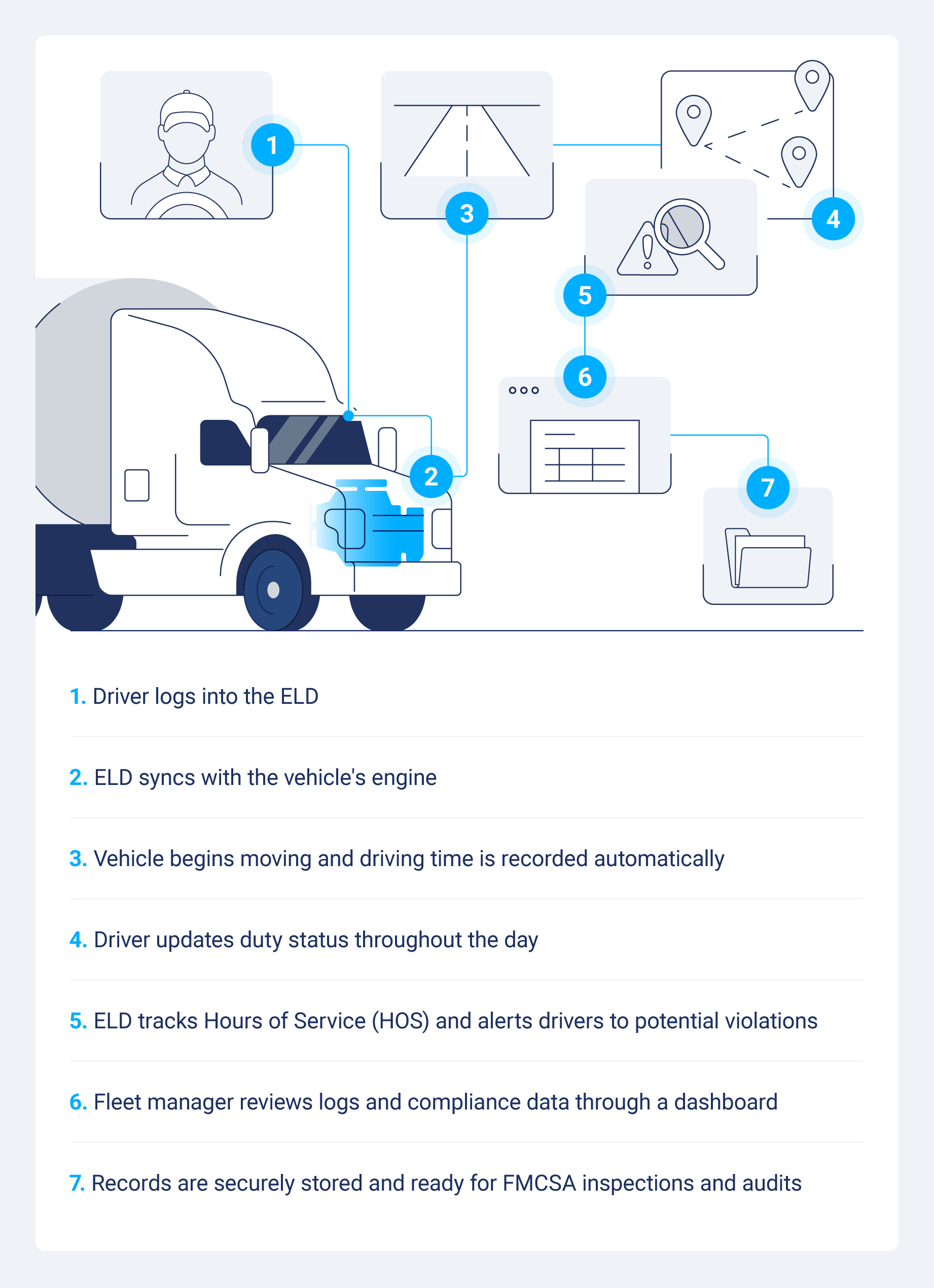
Log in and start the trip
Begin by logging into the ELD system using your unique credentials. Sync the device with the vehicle’s engine and ensure it functions correctly. Verify that all required ELD documentation, including user manuals and malfunction guides, is accessible in the vehicle.
Conduct a thorough pre-trip inspection and record any defects or issues in the ELD. Set your duty status to "On-Duty, Not Driving" before starting the vehicle. This helps you log all activities accurately from the beginning of your shift.
Record duty status changes
Throughout the day, drivers update their duty status as their activity changes from driving to on-duty, not driving, off-duty or sleeper berth. Most systems prompt drivers when a status change is detected. Any edits to logs require an annotation to explain the reason, creating a clear audit trail.
Review, certify and submit logs
At the end of each shift, drivers review their logs for accuracy and digitally certify them. If a DOT officer requires records during a roadside stop, the driver can display the log on the in-cab screen or transfer it electronically via Bluetooth, USB, email or web services. Fleet managers can review logs remotely through a web dashboard.
How to choose the right electronic logbook for your fleet
Choosing the right ELD solution means finding a system that helps you meet federal mandates, works well for your drivers, integrates with your processes and scales with your business. Use this six-step process to evaluate your options:
- Confirm compliance requirements: Check the FMCSA mandate status for your fleet and cross-reference any candidate device against the official FMCSA-registered ELD list.
- Audit current workflows: Identify the friction points in your current process like log errors, late submissions and paper collection, so you know exactly what the new system needs to solve.
- Define must-have integrations: Decide which systems the ELD must connect to, be that dispatch, maintenance, IFTA reporting, fuel management, or payroll.
- Gather driver input: Involve drivers early to encourage faster adoption and fewer compliance errors from day one.
- Run a pilot program: Test with a small subset of vehicles first. These surfaces support issues, real-world violation rates and implementation gaps before a full rollout.
- Calculate total cost of ownership: Factor in hardware, setup, training and exit fees, not just monthly subscription rates. Also consider how a fleet safety program integrates with your ELD data for long-term planning.
Resources like ELD options for owner-operators and guidance on building a fleet safety program can help you frame the broader decisions.
Manage fleet compliance with Geotab
Geotab's ELD solution is built to simplify electronic logbook compliance while connecting HOS data to the broader tools your fleet depends on, like GPS tracking, vehicle diagnostics, driver scorecards and IFTA reporting.
Whether you are evaluating your first electronic logbook or looking to consolidate your compliance stack, Geotab gives your team the visibility and confidence to stay audit-ready every day.
Subscribe to get industry tips and insights
Frequently Asked Questions
An ELD is a FMCSA-mandated hardware device connecting directly to a commercial vehicle’s engine control module to record driving time and duty status for accurate HOS compliance. ELDs were required under the FMCSA rule effective December 18, 2017, replacing older AOBRD systems to standardize digital logging across fleets.
ELDs automatically capture data elements including date, time, location information, engine hours, vehicle miles and identification information for the driver, vehicle and motor carrier. They also record status changes — on-duty, off-duty, driving and not-driving. Some devices further log safety events such as harsh braking and collisions.
An ELD is a certified, engine-connected device meeting FMCSA technical standards, whereas eLog more broadly refers to any electronic log software. eLogs can include manual-entry apps that do not satisfy the ELD rule.
A compliant ELD must be self-certified by its manufacturer and listed on the FMCSA’s official registered ELD list after passing all required technical testing. You can verify compliance by checking the FMCSA ELD registry — devices removed from this list indicate non-compliance and should no longer be used for HOS recording.
Owner-operators need an electronic logbook if they operate a commercial motor vehicle and are required to maintain duty status records. Short-haul exemptions and other exceptions may apply depending on route length and operational profile. It is always best to confirm to make sure you uphold best fleet safety practices.
Yes, drivers can edit electronic logbook records in most ELD systems, but every edit requires a written annotation explaining the reason for the change. Edits are logged with a timestamp, and the original entry remains visible, creating a full audit trail. Fleet managers can also propose log edits, which drivers may accept or reject.
The Geotab Team write about company news.
Table of Contents
Subscribe to get industry tips and insights
Related posts

6 benefits of an open, AI-powered fleet data platform
September 17, 2026
8 minute read

Before the storm call: Five ways to know your utility fleet is ready
August 6, 2026
3 minute read
Beyond consumer apps: 5 ways integrated navigation protects your fleet
July 23, 2026
6 minute read

Closing blind spots in cargo security with a 360 fleet camera system
July 22, 2026
3 minute read
Top 7 transportation management systems (TMS) for small carriers
July 16, 2026
9 minute read

10 best ELD for hotshot truckers to stay compliant and profitable
July 6, 2026
9 minute read