11 must-have fleet management software features for smarter fleet operations
Eleven fleet management software key features that help fleet managers cut costs, strengthen safety and stay compliant.

By Geotab Team
Aug 19, 2026

Key Insights
- Fleet management software can help businesses control operating costs, improve driver safety and manage day-to-day operations more effectively.
- GPS tracking, maintenance alerts and route optimization form the foundation of most fleet programs by improving visibility, efficiency and management.
- Electric logging devices (ELD) and Driver Vehicle Inspection Report (DVIR) compliance tools help fleets stay compliant, identify issues early and keep vehicles road-ready.
- Comparing platforms helps fleet managers choose the right tools to improve safety, efficiency and overall fleet performance.
Rising fuel pricing, maintenance costs and limited vehicle visibility create constant pressure for fleet managers. Fuel and maintenance costs alone account for over 20% of total fleet operating costs. The best fleet management software features bring vehicle and driver data into one system, helping managers simplify operations, maintain compliance and make more informed decisions.
This comprehensive guide reviews 11 top fleet management software features, benefits and what a fleet management software is.
| Feature | Function | Fleet Benefit |
| GPS tracking and real-time vehicle location | Tracks vehicle locations and routes in real time | Improves visibility, dispatching and response times |
| Driver behavior monitoring | Identifies risky behaviors like speeding, harsh braking and idling | Supports driver coaching and safer driving |
| Fuel management | Tracks fuel consumption, costs, idle time and fuel transactions | Reduces fuel waste and operating costs |
| Preventive maintenance scheduling | Uses mileage and engine data to schedule service and maintenance alerts | Helps prevent breakdowns and reduce repair costs |
| ELD compliance | Records driving time and monitors Hours of Service requirements | Helps fleet maintain compliance and avoid violations |
| Route optimization | Plans efficient routes based on stops, traffic and delivery windows | Reduces mileage, fuel use and vehicle wear |
| Dashcam and video telematics | Captures video and detects safety events on the road | Supports driver coaching and collision investigations |
| Asset tracking | Monitors the location and use of trailers and other non-powered assets | Reduces equipment loss and improves utilization |
| Reporting and analytics | Turns fleet, driver, fuel and maintenance data into actionable reports | Helps managers identify trends and make informed decisions |
| Mobile app access | Gives drivers and managers access to fleet tools from mobile devices | Keeps teams connected and productive in the field |
| Integration with third-party tools | Connects fleet data with accounting, fuel and other business systems | Reduces manual data entry and connects workflows |
#1: GPS tracking and real-time vehicle location
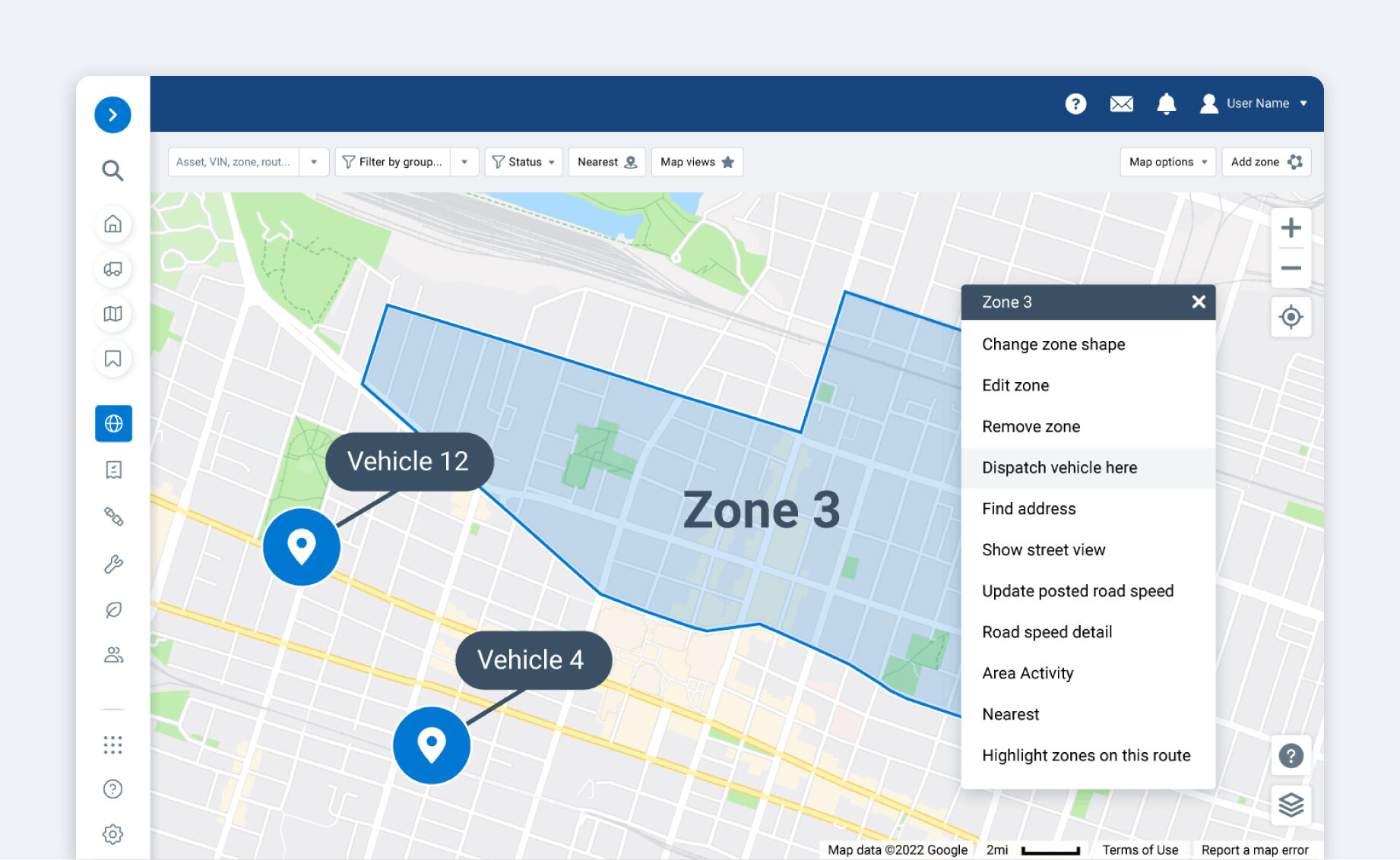
GPS tracking uses satellite data to monitor the live location of every vehicle. Dispatchers use it for accurate arrival estimates, recovering stolen assets and route adjustments. Many platforms also offer geofencing, which triggers alerts when a vehicle enters or leaves a set zone.
Fleet benefit: Real-time location data gives fleet managers greater control over daily operations, helping them respond quickly to delays, changing conditions and customer needs.
#2: Driver behavior monitoring
Driver behavior monitoring tracks harsh braking, rapid acceleration, sharp cornering, speeding and idling. Fleet managers use this data for safety coaching, lowering insurance premiums and identifying drivers who need additional training.
Some fleets use safety scoring to assign driver scorecards based on how safely they drive to gamify the system and track improvements over time.
These fleet management software safety features also connect to fuel costs, since aggressive driving increases fuel usage.
Fleet benefit: Consistent visibility into driver performance gives managers a measurable way to strengthen their safety programs and identify where additional support or training is needed.
#3: Fuel management
Fuel management features track consumption, cost per mile, idle time and fuel card transactions. This data flags excessive idling, fuel card misuse and vehicles with poor fuel efficiency. Many platforms integrate with fuel card providers to reconcile transactions automatically, helping fleets cut waste over time.
For example, a fleet that can reduce idle time by 20 minutes per vehicle per day can generate significant savings — all by simply paying more attention to how efficiently vehicles use fuel.
Fleet benefit: Better visibility into fuel use helps fleet managers understand where operating expenses are coming from and make informed decisions about vehicles, routes and driver practices.
#4: Preventive maintenance scheduling
Preventive maintenance scheduling sends automated alerts for oil changes, tire rotations and inspections based on mileage or engine hours. Catching issues early costs far less than a roadside breakdown. Preventive maintenance follows a set schedule, while predictive maintenance uses vehicle data to identify potential issues before they lead to failure.
Onboard diagnostics flag mechanical issues before they escalate and include data in a digital log that covers service history, repair cost and vehicle-specific data. Managers can easily access this data to pull diagnostic trouble codes (DTCs) directly from the vehicle when it flags an issue before mechanical issues escalate.
Geotab's predictive fleet maintenance tools extend this with data-driven forecasting.
Fleet benefit: A consistent maintenance program helps keep vehicles available for service and makes maintenance planning more predictable across the fleet.
#5: Electronic logging device (ELD) compliance
An electronic logging device (ELD) automatically records a driver's hours of service to replace paper logbooks, as required under FMCSA mandates. It alerts managers when a driver is nearing their legal Hours of Service (HOS) limits by tracking driving time and rest breaks in real-time.
Related compliance tools include driver vehicle inspection reports and IFTA reporting. These tools help fleets remain compliant and avoid costly fines, out-of-service orders and increased legal liability.
Fleet benefit: Automated compliance records give fleet managers greater confidence that driver hours are being monitored consistently and documentation is readily available when needed.
#6: Route optimization
Route optimization calculates the most efficient sequence of stops based on distance, traffic and delivery windows. Fewer miles driven can reduce fuel costs, increase deliveries per shift and reduce vehicle wear. Dynamic rerouting adjusts a route in real-time based on traffic or new assignments, standing apart from basic routing, which only highlights the shortest path.
Pairing this with field service management software helps teams schedule jobs from one place.
Fleet benefit: More efficient routing helps fleets make better use of available vehicles and drivers while keeping daily operations on schedule.
#7: Dashcam and video telematics
Video telematics uses in-cab and forward-facing cameras to record footage triggered by events such as hard braking or a collision. Fleets use this footage for driver coaching to correct unsafe events and liability protection against false claims.
AI-powered dashcams can go beyond this, detecting distracted driving or phone use in real-time to improve driver safety.
Footage for dashcams and video telematics can be stored on a local device or uploaded automatically to the cloud to save space and prevent tampering.
Fleet benefit: Video gives safety teams a clearer picture of what happened during a driving event, supporting more informed decisions about coaching, claims and liability.
#8: Asset tracking
Asset tracking differs from vehicle tracking in that it monitors non-powered equipment like trailers or generators, using battery-powered GPS tags or Bluetooth sensors to send location updates for equipment without engines. This helps teams locate gear across large job sites, reducing equipment loss and improving usage rates.
The strongest platforms unify vehicle tracking and equipment tracking software in one dashboard for maximum visibility.
Fleet benefit: Knowing where equipment is and how often it is being used helps managers make better decisions about asset allocation and future equipment needs.
#9: Reporting and analytics
Reporting tools summarize fleet utilization, cost per vehicle, driver performance, fuel spend and maintenance history. Standard templates cover common needs while custom reports let managers filter by user-defined metrics like vehicle utilization, fuel consumption, maintenance costs, driver safety scores or idle time.
Sophisticated reporting tools include a layer of automation that allows managers to schedule reports to be delivered by email on a weekly or daily basis. Many include different export options to make it easier to feed data into accounting and enterprise resource planning (ERP) systems.
Fleet benefit: Bringing key fleet metrics into a single view makes it easier to identify trends, measure performance and prioritize areas for improvement.
#10: Mobile app access
A manager-facing mobile app lets users view live vehicle locations and approve maintenance requests from a phone. Driver-facing features include accepting jobs, submitting DVIRs, logging HOS and communicating with dispatch.
These apps offer offline functionality that allows users to sync data once connectivity is restored, an essential remote fleet management software feature for distributed teams. Make sure to test the mobile experience for any tool to ensure it works well for your field team.
Fleet benefit: Mobile access keeps drivers, dispatchers and managers connected when they are away from a desktop, helping information move between the field and office without unnecessary delays.
#11: Integration with third-party tools
A strong fleet management software solution should connect with accounting platforms like QuickBooks and fuel card providers. Look for pre-built integrations, open API access for custom connections and webhook support for real-time sharing.
Poor integration forces manual data entry, which wastes time and introduces errors.
Fleet benefit: Connected systems give teams a more complete view of fleet operations and reduce the need to switch between separate platforms to manage related tasks.
What is fleet management software?
Fleet management software is a centralized platform that uses telematics data to help businesses monitor and manage their vehicle fleets. Core components include GPS tracking hardware, cloud dashboards and mobile driver apps. Platforms range from basic tracking to comprehensive systems covering fuel, maintenance and safety.
Comparing these features with the options included in a guide to the best fleet management software can help clarify which platforms align with your fleet's operational needs.
Choose features that support long-term fleet success
The right fleet management software features depend on a fleet's specific pain points, priorities and growth plans. Platforms that address those needs can help fleets improve efficiency, maintain compliance and strengthen safety as they scale.
Geotab's fleet management software features bring tracking, compliance, safety and maintenance into one platform built to scale. Request a demo today to see how it brings all of these recommended features and more to life.
Subscribe to get industry tips and insights
Frequently Asked Questions
The five pillars of fleet management are vehicle tracking, driver safety, maintenance, fuel management and compliance. Most fleet management software features focus on these core areas.
Route optimization improves fuel efficiency by reducing the total miles a fleet drives every day. Fewer miles and better-sequenced stops lower fuel consumption across a large fleet.
Small fleets can benefit from fleet management software just as much as large ones. Many platforms, including Geotab, offer scaled plans, so a small fleet can access GPS tracking and safety tools without paying for features it does not need.
Fleet management platforms do work for non-vehicle assets through dedicated asset tracking tools. For example, Geotab supports asset tracking with battery-powered GPS devices that can provide visibility into trailers and other equipment without an engine.
Fleet management software cost varies based on fleet size, hardware and features included in the plan. Pricing varies by provider, features and fleet size, with many solutions requiring fleets to request a custom quote.
The Geotab Team write about company news.
Table of Contents
- #1: GPS tracking and real-time vehicle location
- #2: Driver behavior monitoring
- #3: Fuel management
- #4: Preventive maintenance scheduling
- #5: Electronic logging device (ELD) compliance
- #6: Route optimization
- #7: Dashcam and video telematics
- #8: Asset tracking
- #9: Reporting and analytics
- #10: Mobile app access
- #11: Integration with third-party tools
- What is fleet management software?
- Choose features that support long-term fleet success
Subscribe to get industry tips and insights
Related posts

Top seven best fleet fuel cards: How to choose the right one for your business?
October 1, 2026
7 minute read
Four ways to transform garbage fleet efficiency with data and video tools
September 28, 2026
4 minute read

Why the OEM versus device-level telematics debate misses the point for mixed-fleet operators
September 25, 2026
2 minute read

6 benefits of an open, AI-powered fleet data platform
September 17, 2026
8 minute read