How to find a vehicle identification number (VIN) [+ tips for decoding]
Learn how to find a vehicle identification number (VIN), decode its hidden details and detect potential issues before they turn into costly problems.

Software Project Specialist at Geotab
Mar 26, 2025

Key Insights
- Every vehicle is assigned a unique 17-character vehicle identification number (VIN) that reveals details like the manufacturer, model and production specifics.
- You can find the VIN on various parts of your vehicle, including the dashboard, the driver’s door jamb and registration documents.
- VINs are vital for tracking recalls, verifying vehicle history and ensuring authenticity.
Whether you're verifying your vehicle for insurance or simply curious about its history, knowing how to find a VIN and decode it can provide invaluable insights. This skill is useful for both individual owners and companies managing large fleets.
For fleet operators, understanding VIN details means improved tracking, efficient maintenance scheduling and enhanced compliance with safety regulations. All of this contributes to reducing costs and optimizing asset management.
We'll walk you through the process of locating and decoding your VIN, giving you practical tips and tools — including a VIN decoding chart — to make VIN detection straightforward.
What is a VIN?
A VIN is a unique 17-character code assigned to every vehicle during manufacturing. Acting as a vehicle’s fingerprint, the VIN encodes essential details like the make, model, production year, engine type and country of origin. This standardized identifier ensures that no two vehicles share the same code, critical for tracking a car’s history, such as recalls, registrations and title transfers.
VINs help verify a vehicle’s authenticity when buying or servicing a car and streamline safety routines. For example, when going through a pre-tip inspection checklist, the VIN can help you confirm that you’re reviewing the correct vehicle specifications and history. It helps ensure that all maintenance and safety checks are accurate and complete.
Where can you find your VIN?
Now that you know what and how long a VIN is, let’s discuss where you can find it. Your vehicle’s VIN is printed in several key locations, such as your vehicle registration documents, making it easy to verify and track.
Where is the VIN on a truck?
You can find VINs in a few locations on your truck, like stamped on the engine block. The most common spots include the lower corner of the dashboard on the driver's side (visible through the windshield) and the driver’s side door jamb.
Modern vehicles may also embed VIN details within their digital systems and vehicle tracking devices, making it easy to access the information through onboard diagnostics or a connected mobile app. This digital integration ensures that even if the physical VIN plate is hard to locate, you can still verify your vehicle’s unique identifier quickly and accurately.
Where is the VIN on registration?
Not only is the VIN stamped on your vehicle, but the VIN is on the registration document. Your registration, along with the title and insurance papers, lists the VIN with other important details, such as your vehicle's make, model and year.
This inclusion ensures that all official records are consistent, helping you easily verify ownership, secure insurance coverage and meet legal requirements.
How to read a VIN
Understanding how to read your VIN can reveal a wealth of information about your vehicle, from its origin to its unique production details.
By dividing the 17-character code into specific segments, you can quickly decode the manufacturer's identity model characteristics and verify the code's accuracy.
We can divide these characters into four categories, and here is what they represent:
- World Manufacturer Identifier (WMI): The first three characters reveal the country of origin and the vehicle manufacturer.
- Vehicle Description Section (VDS): Characters 4 through 8 describe the vehicle’s model, body style, engine type and other design features.
- Vehicle Identification Section (VIS): Characters 10 through 17 include the model year, the assembly plant and a unique production sequence number.
- Check digit: The ninth character is a security measure — a check digit calculated by a specific formula to verify that the VIN is valid and hasn’t been tampered with.
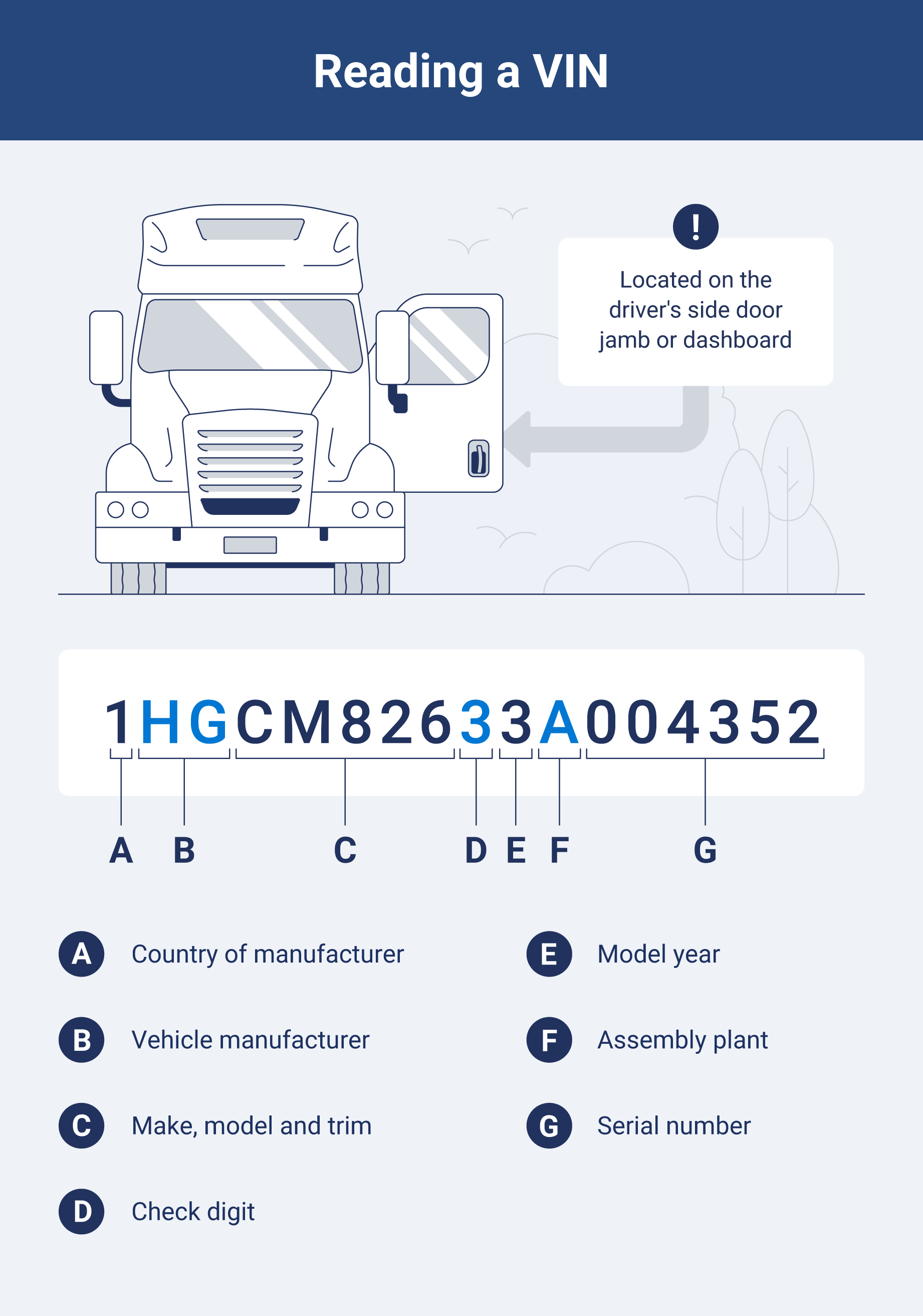
To help you better understand how to read a VIN, let's decode one: 1HGCM82633A004352.
Country of manufacturer
The first character of the VIN, in this case, 1, indicates the country where the vehicle was built. For our example, 1 denotes the United States, essential for verifying compliance with regional manufacturing standards.
Vehicle manufacturer
The next two characters complete the WMI. In 1HG, the HG identifies the manufacturer as Honda. This information is crucial for sourcing parts, servicing vehicles, and maintaining brand-specific maintenance protocols.
Make, model and trim
Characters 4 through 8 — here CM826 — provide details about the vehicle’s make, model and trim level. This section describes key features such as the body style and engine type, helping you understand the vehicle’s specifications for optimal performance and maintenance schedules.
Check digit
The ninth character of the VIN, 3 in our example, is the check digit. This digit is calculated using a specific algorithm to verify the accuracy of the entire VIN, ensuring that no transcription errors have occurred during record keeping.
Model year
The tenth character represents the model year. In this VIN, the digit 3 indicates that the vehicle is a 2003 model. This detail is vital for fleet management, affecting maintenance schedules, depreciation rates and regulatory compliance.
Assembly plant
In this example, the eleventh character, A, identifies the assembly plant where the vehicle was manufactured. Knowing the assembly plant helps track production details and address manufacturer-specific recalls or service advisories.
Serial number
The final six characters, 004352, serve as the serial number. This unique identifier distinguishes this specific vehicle from all others produced at the same plant, which is critical for precise tracking, warranty claims and inventory management in fleet operations.
How a VIN decoder works
Now that you know what a VIN looks like, you can use an online VIN decoder tool that breaks down the 17-digit code into its defined segments. Each digit represents specific details about the vehicle. This information comes in handy during regular inspections such as the DOT audit.
It uses a VIN decoding chart to interpret the model year code, which is located in the 10th position of the VIN. This chart helps you determine the correct model year for your vehicle by matching the code with its corresponding year.
Note: The VIN year code repeats every 30 years.
| VIN code | Model year | VIN code | Model year | VIN code | Model year |
|---|---|---|---|---|---|
| A | 1980 / 2010 | L | 1990 / 2020 | Y | 2000 / 2030 |
| B | 1981 / 2011 | M | 1991 / 2021 | 1 | 2001 / 2031 |
| C | 1982 / 2012 | N | 1992 / 2022 | 2 | 2002 / 2032 |
| D | 1983 / 2013 | P | 1993 / 2023 | 3 | 2003 / 2033 |
| E | 1984 / 2014 | R | 1994 / 2024 | 4 | 2004 / 2034 |
| F | 1985 / 2015 | S | 1995 / 2025 | 5 | 2005 / 2035 |
| G | 1986 / 2016 | T | 1996 / 2026 | 6 | 2006 / 2036 |
| H | 1987 / 2017 | V | 1997 / 2027 | 7 | 2007 / 2037 |
| J | 1988 / 2018 | W | 1998 / 2028 | 8 | 2008 / 2038 |
| K | 1989 / 2019 | X | 1999 / 2029 | 9 | 2009 / 2039 |
How to find vehicle specs by VIN through the Geotab decoder
Manually looking up the VIN can take some time, but if you have a MyGeotab account, you can decode your VIN in no time.
To use our Vin Decoder, you need to enable Feature Preview in your user interface (UI) Settings. Note: Since these new features may change, break or disappear, we do not recommend using them in a production setting.
If you wish to enable Feature Preview in MyGeotab, click on your account name at the top right corner, click the Options button, and under UI SETTINGS, set the toggle for Feature Preview to On. Click Save.
Here’s how you can use VIN Decoder in MyGeotab:
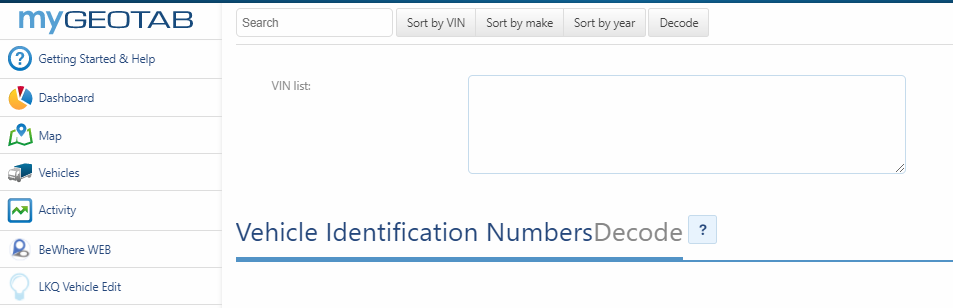
- Log in to MyGeotab and go to the web page: https://my.geotab.com/<your database>/#vinDecoder.
- Type or copy and paste the VINs into the box (one per line), then click the Decode button.
- Information about that VIN will be displayed, including the vehicle make, model year, manufacturer, vehicle type, plant, brake type, body, engine and others.
You can even sort the results by VIN, make or year.
Optimize vehicle management with Geotab
Geotab’s telematics platform streamlines vehicle management by providing real-time tracking, driver behavior insights and proactive maintenance alerts — all essential for efficient fleet operations.
We help you optimize your fleet by managing trucking logistics and compliance adherence while seamlessly integrating with other fleet management tools.
Subscribe to get industry tips and insights
Frequently Asked Questions
Your VIN can usually be found on the lower corner of the dashboard (visible through the windshield), inside the driver’s door jamb or on your vehicle’s registration and title documents.
You can use free online VIN decoders such as those offered by NHTSA, Geotab, Carfax or AutoZone to retrieve detailed vehicle information.
A VIN is a 17-character alphanumeric code. Example: 1HGCM82633A004352.
The VIN itself doesn’t directly include wheelbase data. However, by decoding your VIN to identify your vehicle’s make, model and year, you can then look up the technical specifications — either through the manufacturer’s documentation or a comprehensive VIN lookup tool — that might provide the wheelbase measurement.
Software Project Specialist at Geotab
Kevin Buchaly is a Software Project Specialist at Geotab with over eight years of experience in software development.
Table of Contents
Subscribe to get industry tips and insights
Related posts



Your ultimate back to school bus fleet operations checklist
August 6, 2025
4 minute read

What is fleet lifecycle management? Guide to extend your vehicle’s life
July 29, 2025
5 minute read
.jpg)

The future of transportation: Trends, research and what’s next according to experts
July 17, 2025
9 minute read