How to track and monitor company vehicles using vehicle monitoring systems (VMS)
Learn how vehicle monitoring systems turn connected vehicle data into useful fleet insights. See how tracking works and what to evaluate before rolling out a system across your fleet.

By Geotab Team
Oct 8, 2026
Key Insights
- Businesses learning how to track company vehicles can connect GPS-enabled telematics devices with fleet management software for centralized visibility.
- A VMS can show vehicle locations and trip history while providing insight into driver activity and vehicle health.
- Fleet managers can use monitoring data to support safer driving and improve efficiency. This information can also guide maintenance planning and compliance efforts.
- A phased rollout helps organizations verify system compatibility and establish clear monitoring policies before expanding fleetwide.
A vehicle monitoring system (VMS) uses telematics to give businesses greater visibility into company vehicles and how they are being used. Fleet managers can connect GPS-enabled telematics hardware with fleet management software to access this information.
The VMS collects data from connected vehicles and sends it to a centralized platform. Depending on the system, fleet managers can monitor vehicle locations, trip history, driver activity and vehicle health.
This guide explains how the technology works and what it can track. It also covers how to choose the right system and roll it out across your fleet.
How can I monitor my company’s vehicles?
You can monitor company vehicles by installing GPS-enabled telematics devices and connecting them to fleet management software. Depending on the solution, authorized users can view live locations, trip histories, driving events and diagnostic information. The system may also provide maintenance schedules or configurable alerts.
A vehicle monitoring system combines connected hardware with software that organizes vehicle data in a central platform. Fleet managers can use this information to oversee daily activity and identify patterns that may affect performance.
A basic GPS tracker primarily reports a vehicle’s location. A telematics or vehicle tracking management system provides broader operational information alongside GPS data. Acting on these insights may help a business improve fleet efficiency and reduce unnecessary fuel use.
How does a vehicle monitoring system (VMS) work?
A vehicle monitoring system combines connected telematics hardware with fleet management software. That hardware relays each vehicle's activity to a cloud-based platform, where fleet managers can review it and act.
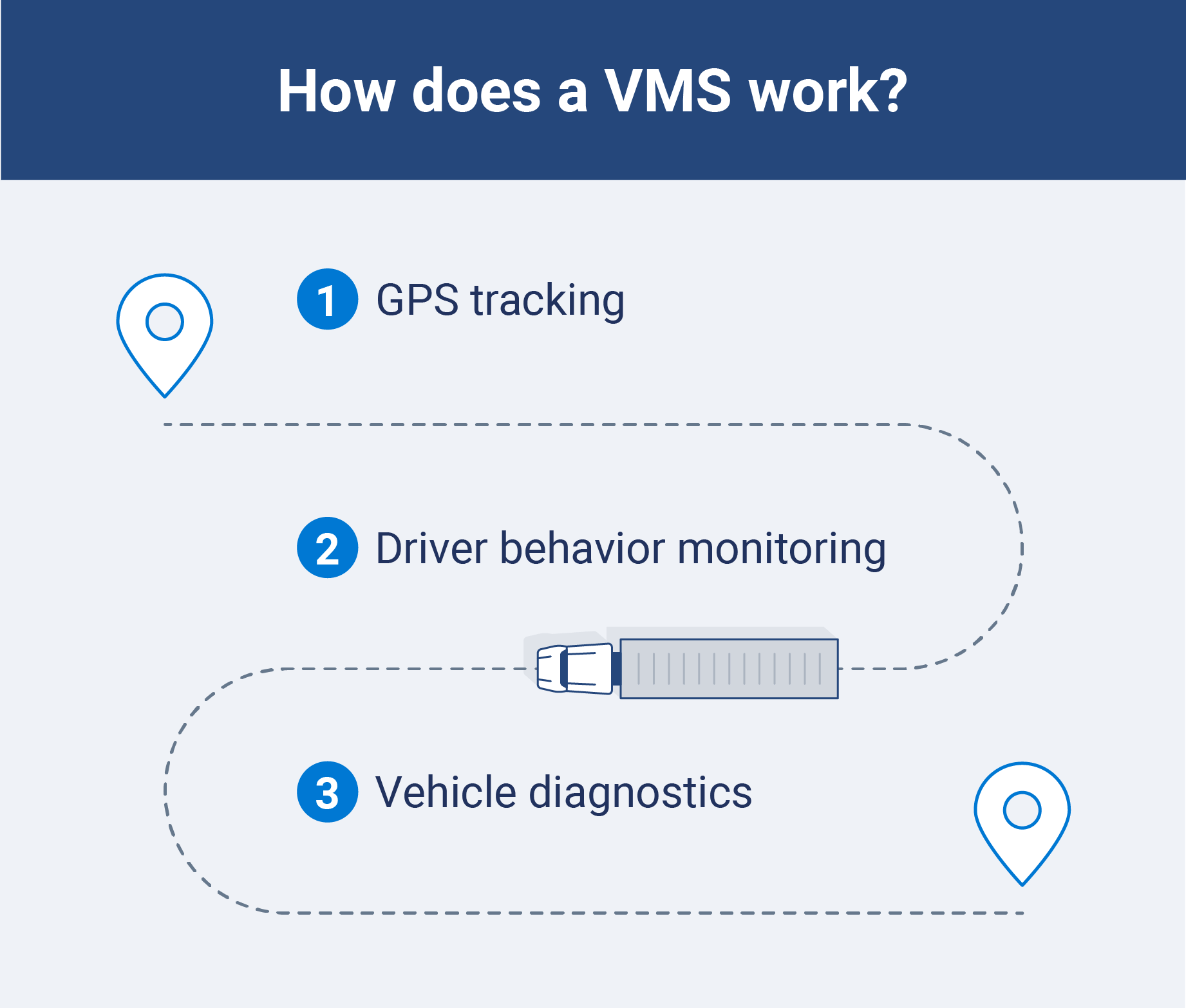
Depending on the setup, a VMS may collect GPS location and driving-event data. Compatible vehicles or integrations can also provide engine diagnostics and other operational information.
1. Connect a telematics device
Install or connect a compatible vehicle-tracking device in each vehicle. The device uses GPS technology to determine the vehicle’s location and can record operational data when a connection is available.
Some devices can also collect engine data or detect driver behaviors such as speeding and harsh braking. Available data depends on the vehicle and system configuration.
2. Send vehicle data to fleet management software
The telematics device transmits collected information to a cloud-based fleet management platform. Authorized users can then access current vehicle data without inspecting each vehicle in person.
Transmission frequency varies by system and connectivity. Some platforms update vehicle locations frequently, while others send information at scheduled intervals or after specific events.
3. Review maps, reports and alerts
Fleet managers can view vehicle activity through maps and dashboards. They can also generate reports or configure alerts based on their operational priorities.
For example, a geofence alert can notify a manager when a vehicle enters or leaves a designated area. An idling report can reveal where vehicles spend unnecessary time running, helping the fleet investigate potential fuel waste.
What can you monitor on company vehicles?
A vehicle monitoring system can give fleet managers insight into vehicle activity while supporting driver safety and operational efficiency. Available capabilities depend on the vehicles, connected hardware and software configuration.
| Capability | What it can show |
| GPS tracking | Current vehicle locations and movement |
| Trip history | Completed routes, stops, mileage and trip times |
| Driver behavior monitoring | Events such as speeding, harsh braking, rapid acceleration and sharp cornering |
| Vehicle utilization | How often vehicles operate and how long they remain in use |
| Idling monitoring | Where idling occurs and how long it lasts |
| Remote diagnostics | Compatible fault codes and engine health information |
| Maintenance tracking | Mileage-based or engine-hour service intervals |
| Geofencing | When vehicles enter or leave designated areas |
| Fuel or energy monitoring | Consumption patterns and changes in efficiency |
What are the benefits of tracking company vehicles?
A VMS gives fleet managers greater visibility into vehicle activity, helping them make more informed operational decisions. Here are some benefits of tracking company vehicles:

Supports driver safety and reduces risk
A VMS can help fleet managers identify driving patterns that may increase collision risk. Managers can monitor events such as speeding and harsh braking across connected vehicles.
Fleet managers can use these insights to provide targeted coaching or update safety policies. Addressing recurring behaviors may help drivers build safer habits and reduce risk across the fleet.
Enhances fleet efficiency
Vehicle location data helps fleet managers improve dispatch and delivery efficiency. When road closures or traffic delays affect a route, dispatchers can redirect drivers around the disruption.
GPS tracking also helps managers confirm that vehicles reach expected locations and stay on schedule.
Improves asset utilization
A VMS shows when vehicles are active and how long they remain idle. Fleet managers can use this information to identify underused assets and balance vehicle assignments across the fleet. Usage patterns can also help teams schedule maintenance during low-demand periods to minimize service disruptions.
Enables proactive maintenance
A VMS can collect engine RPM and fuel consumption data from compatible vehicles. Fleet managers can use these insights to support predictive maintenance and address developing issues before breakdowns occur.
For electric fleets, connected data can also support EV fleet management by helping teams monitor energy use and plan service around vehicle needs.
Supports regulatory compliance and accurate records
A compatible VMS can help fleets maintain accurate records for hours-of-service requirements and IFTA fuel tax reporting. The system can flag potential discrepancies and organize relevant fleet data, helping managers address issues before they lead to violations.
Accurate records can also assist fleets preparing for a DOT audit by making required information easier to organize and review.
How to choose a company vehicle tracking system
Start by identifying the business problem you want the system to solve. A basic GPS tracker may meet your needs if you only want to view vehicle locations. A broader vehicle tracking and monitoring system is crucial if your fleet also needs insights into utilization, maintenance, safety and routing.
As you compare options, evaluate:
- Business goals: Define the results you want the system to support.
- Fleet requirements: Consider your current fleet size and expected growth.
- Compatibility: Confirm that the hardware works with your vehicles and other assets.
- Available data: Determine which location, trip, diagnostic and utilization details the system provides.
- Platform functionality: Compare data refresh rates, reporting features, mobile access and third-party integrations.
- Implementation: Review installation requirements and the total cost of ownership.
- Security: Look for strong data protection and configurable user access controls.
- Support: Assess the provider’s onboarding resources and ongoing customer service.
Compare each system’s capabilities with its hardware and subscription costs. The lowest-priced option may work for location tracking, while a telematics platform that grows with your fleet can provide greater value as your operational needs expand.
How to roll out vehicle monitoring across your fleet
A phased rollout can help your organization identify technical issues and build driver confidence before expanding the system fleetwide. Follow these steps to support a smoother implementation:
- Define your goals: Identify the problems you want to solve and select metrics for tracking progress.
- Choose compatible technology: Confirm that the hardware works with your vehicles and connects to the software your team needs.
- Create a written policy: Establish how employees can use company vehicles. The policy should also explain privacy protections and who can access monitoring data.
- Communicate with employees: Explain what the system monitors and how your organization uses the information.
- Train your team: Show managers how to use the platform and help drivers understand how monitoring affects their work.
- Start with a pilot program: Test the system with a small group of vehicles or drivers before deploying it across the fleet.
- Evaluate the rollout: Review system settings and team workflows after launch. Adjust them based on the results and employee feedback.
Track and monitor company vehicles with Geotab
A vehicle monitoring system's real value comes from what fleet managers do with the data, not just the map view. It helps them understand asset use and spot areas that need attention.
Geotab connects vehicle-tracking devices with fleet management software to provide centralized visibility into company vehicles. Businesses learning how to track company vehicles can also use tools such as geofencing to monitor movement within designated areas.
Subscribe to get industry tips and insights
Frequently Asked Questions
The best way to track company vehicles is with GPS-enabled telematics devices connected to fleet management software. This setup gives authorized users centralized access to location and other compatible fleet data.
An interior car monitoring system monitors the inside of a car to enhance safety for the driver and their passengers. Sensing devices such as cameras and radar can alert people to hazards, including unclipped seat belts and break-ins.
A vehicle monitor detects dangerous driving habits, such as speeding and aggressive braking. Fleet managers are informed of these behaviors to alleviate them and improve safety.
Businesses can generally track vehicles they own, but legal requirements vary by location and circumstance. Organizations should consult legal counsel about the laws applicable to their operations and clearly disclose their monitoring practices, including how they will use the data they collect.
An in-vehicle monitoring system uses connected devices and software to collect information about a vehicle and its operation. Depending on the setup, it may monitor GPS location, driving events, vehicle diagnostics, fuel use and maintenance needs.
GPS (global positioning system) refers to the satellite-based technology that allows drivers to determine their location via satellite navigation systems.
A VMS will also utilize GPS technology to locate its vehicles and the geographical location of its drivers. GPS is merely a technology that’s an integral component of a VMS.
The best GPS tracker depends on fleet size, vehicle compatibility and the information a business needs. Commercial fleets should look for a tool with reliable location data, configurable alerts, reporting capabilities and integrations with their existing fleet tools.
A tracking device can be connected to the vehicle’s diagnostic port or installed elsewhere in the vehicle. Employees should review the company’s vehicle-use policy or ask their fleet manager where the device is located and what information it collects. Drivers should not disconnect or tamper with installed equipment.
The Geotab Team write about company news.
Table of Contents
- How can I monitor my company’s vehicles?
- How does a vehicle monitoring system (VMS) work?
- What can you monitor on company vehicles?
- What are the benefits of tracking company vehicles?
- How to choose a company vehicle tracking system
- How to roll out vehicle monitoring across your fleet
- Track and monitor company vehicles with Geotab
Subscribe to get industry tips and insights
Related posts
How to start a trucking business: Step-by-step guide for owner operators
October 28, 2026
6 minute read

Garbage truck safety: Three questions for your video review process
October 28, 2026
4 minute read

How private haulers can help prepare their fleets for new waste management contracts
October 23, 2026
4 minute read


Top seven best fleet fuel cards: How to choose the right one for your business?
October 1, 2026
7 minute read