GPS fleet tracking small businesses: A complete guide
Compare five GPS fleet tracking options for small businesses, including benefits and setup.

By Geotab
Nov 11, 2026
Key Insights
- GPS fleet tracking for small businesses shows owners where their vehicles are and how they’re used.
- Tracking can reveal excess idling and inefficient routes, giving owners a way to measure potential fuel savings.
- Compare GPS fleet tracking solutions based on vehicle compatibility, tracking features and total cost to find the right fit for your small business.
- Start with a small rollout and review the first 30 days of data before making any changes to routes or driver guidance.
A customer needs a plumber urgently, but you do not know which van is closest. One may even be idling between jobs. For an owner in that position, GPS fleet-tracking for small businesses can reveal where vehicles are and where time or fuel is being wasted.
GPS fleet tracking shows vehicle locations and activity on a map, making it easier to dispatch the right driver. This guide compares five GPS fleet tracking solutions for small businesses and explains how tracking works, what it costs, its benefits and how to get started.
1. Geotab
An urgent plumbing call comes in, but your dispatcher doesn’t know which van is closest or available. Geotab helps your team locate vehicles in MyGeotab and review their activity to assign a nearby driver. The same platform brings together vehicle diagnostics and driver safety insights, helping you manage more than the next job.
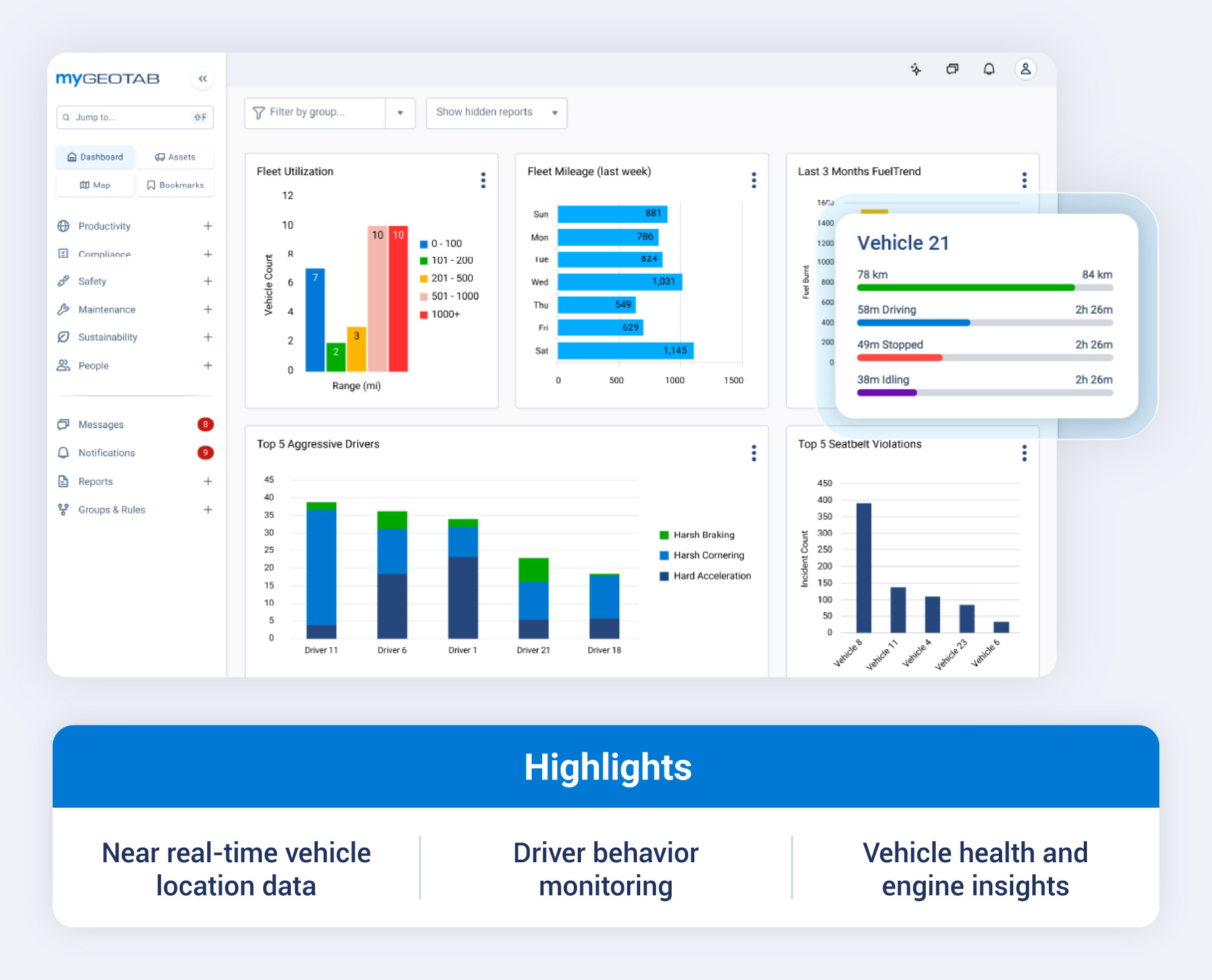
Geotab’s GO device uses patented curve-based logging to capture changes in location and speed, creating detailed trip records. Teams can review routes after a job, spot excessive idling between stops and better understand driving events. Geotab Developers
For driver safety, Geotab’s collision risk tools assess future risk and compare performance with similar fleets, helping managers prioritize coaching. Businesses can also add GO Focus AI dash cams to review video alongside vehicle data in MyGeotab, giving teams more context when investigating safety events.
Geotab is a strong fit for small businesses that want detailed trip records, vehicle health insights and predictive safety tools to guide maintenance and driver coaching.
Key features
- GPS vehicle tracking: View vehicle locations and trip history in MyGeotab to make dispatch decisions and review completed trips.
- Fuel management: Use fuel data to identify excessive idling and driving habits that may increase fuel use.
- Driver safety tools: Set alerts and review driver safety reports to guide coaching on specific driving behaviors.
- Maintenance monitoring: Review engine faults and maintenance data in Geotab’s fleet maintenance tools to determine which repairs take priority.
- AI dash cams: Add GO Focus cameras to bring video and telematics data together in MyGeotab, giving your team context for reviewing safety events.
2. Samsara
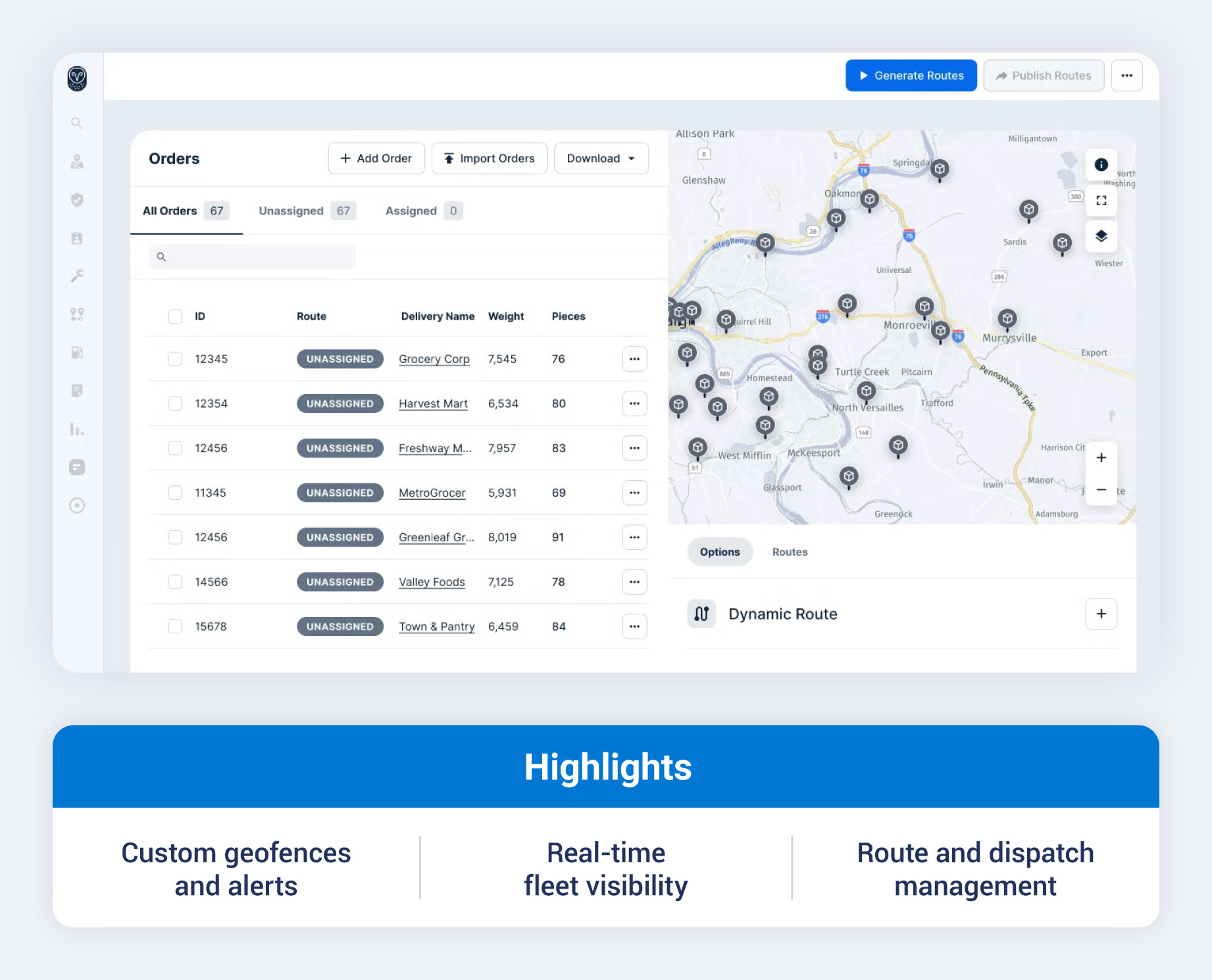
Samsara is worth considering for small businesses that need to plan routes and track progress across multiple stops. Its Vehicle Gateway sends location and vehicle data to the fleet management platform, where teams can monitor drivers, review past trips and coordinate jobs throughout the day.
Routing tools help dispatchers plan stops and follow route progress, while Connected Maintenance tracks fault codes and service needs. Businesses can also add Samsara’s AI Dash Cams for footage and alerts that support driver coaching.
Key features
- GPS fleet tracking: View and track live vehicle locations and trip history through Samsara’s GPS tracking tools to coordinate drivers and check route activity.
- Routing and dispatch: Use routing tools to plan routes and monitor progress as drivers complete their stops.
- Vehicle maintenance: Track fault codes and service needs with Connected Maintenance to help schedule repairs.
- Video safety: Add AI Dash Cams for video footage, driving alerts and coaching tools.
3. GPS Insight
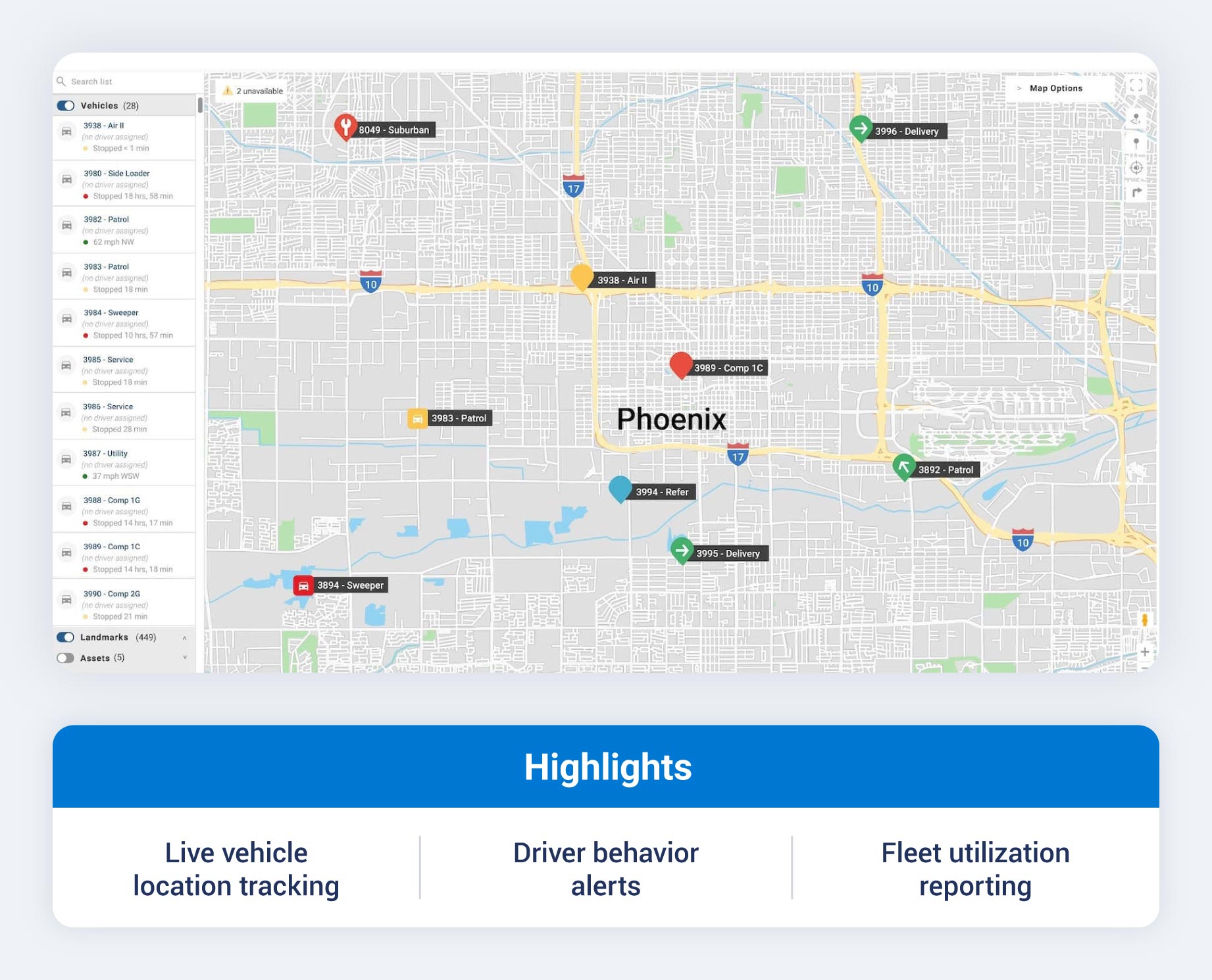
GPS Insight is worth considering for service businesses that want vehicle tracking and driver communication in the same portal. Dispatchers can find vehicles near a customer’s address and, with messaging enabled on their plan, send job details to drivers by SMS from the vehicle card. This helps teams coordinate new assignments without switching between the map and a separate messaging tool.
GPS Insight also offers driver behavior alerts and customizable reports to help teams identify excessive idling or vehicle use outside working hours. Owners can use these insights to focus coaching and investigate activity that falls outside company policies.
Key features
- Live fleet map: Use GPS tracking maps to locate vehicles and find a nearby technician for a new job.
- Custom alerts: Set GPS tracking alerts for events that warrant a closer look, including speeding or movement outside a defined area.
- Driver scorecards: Review driving events through driver behavior reports to make coaching more specific.
- Fleet reporting: Use GPS tracking reports to examine trip activity and idling trends across vehicles.
4. Verizon Connect
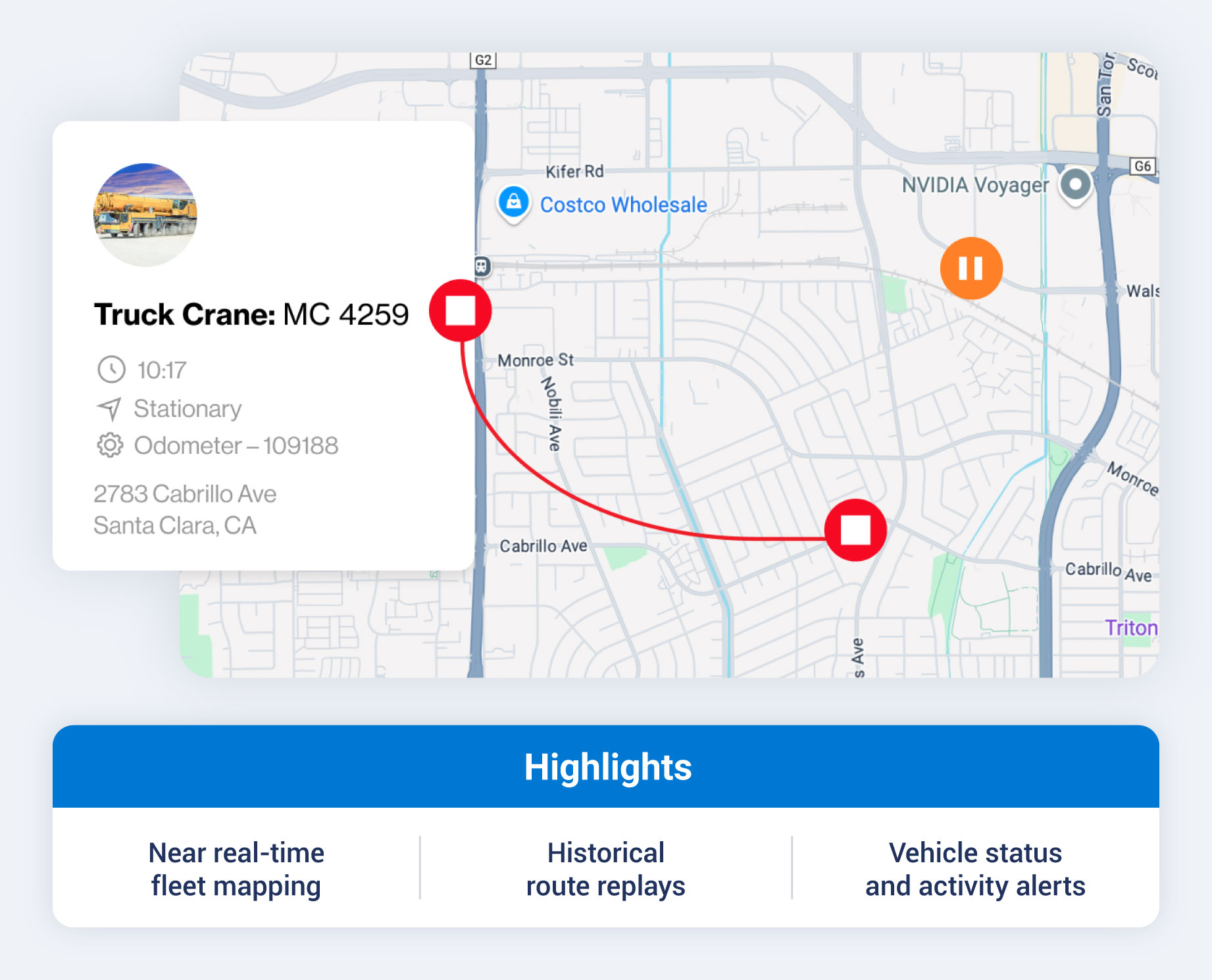
Verizon Connect offers small business GPS fleet tracking through Reveal, giving owners a live view of their vehicles throughout the workday. Dispatchers can use the map to assign a nearby driver, while route replay helps owners check where a vehicle traveled after a job is complete.
Reveal ties idling and speeding alerts to fleet reports, so the cost of a habit is visible in one place. Its mobile apps keep that information accessible away from the office.
Key features
- Near-real-time tracking: Use the live fleet map to locate vehicles and respond to changes throughout the workday. Location updates can occur as often as every 30 seconds.
- Geofence alerts: Draw virtual boundaries around job sites or other key locations with geofence monitoring and receive alerts when vehicles enter or leave them.
- Fleet reports: Review idling and driver behavior through customizable dashboards and reports to spot patterns across vehicles.
- Mobile fleet access: Check locations and alerts while away from your desk with Reveal’s mobile apps.
5. One Step GPS
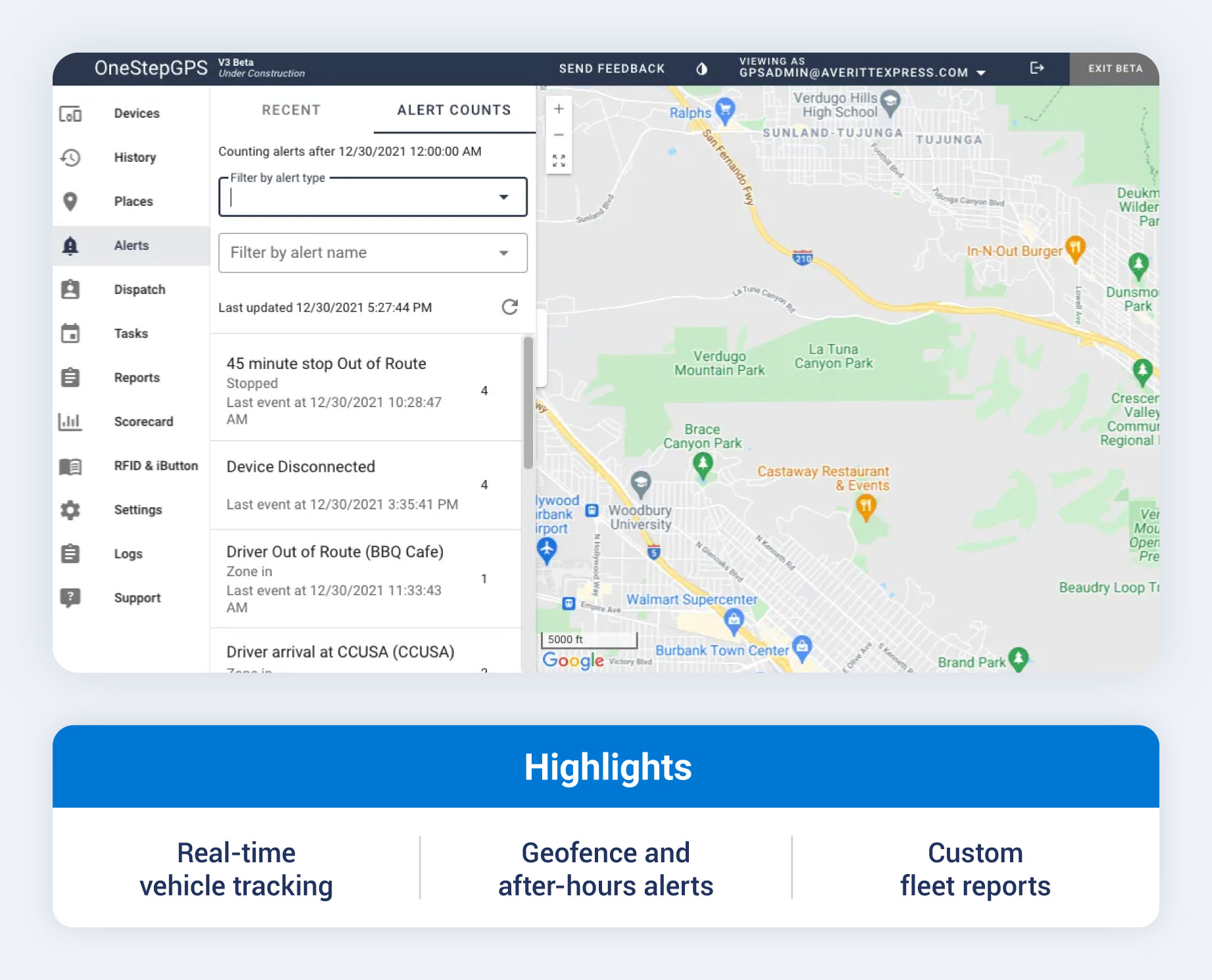
For small businesses that want to start tracking vehicles without a lengthy commitment, One Step GPS's clear monthly price and no long-term contract make it worth a look. Its plug-in tracker and web-based platform show vehicle locations shortly after setup, with access on desktop or phone.
One Step GPS also includes alerts and driver scorecards to help spot speeding or harsh driving.
Key features
- Live vehicle locations: Use the fleet tracking map to see which vehicle is available and closest to a job site.
- Route history: Review past routes and stop durations through the small fleet tracking platform when checking job activity or mileage.
- Driver safety monitoring: Use driver scorecards and alerts to identify speeding or harsh driving that may call for coaching.
- Maintenance reminders: Set service reminders based on mileage or engine hours to keep routine maintenance on schedule.
How GPS fleet tracking works
A tracking device in each vehicle receives GPS satellite signals and uses them to calculate its position. The device then sends its location over a cellular network to a cloud-based dashboard. If connected to the vehicle’s diagnostic system, it can send engine data through the same connection.
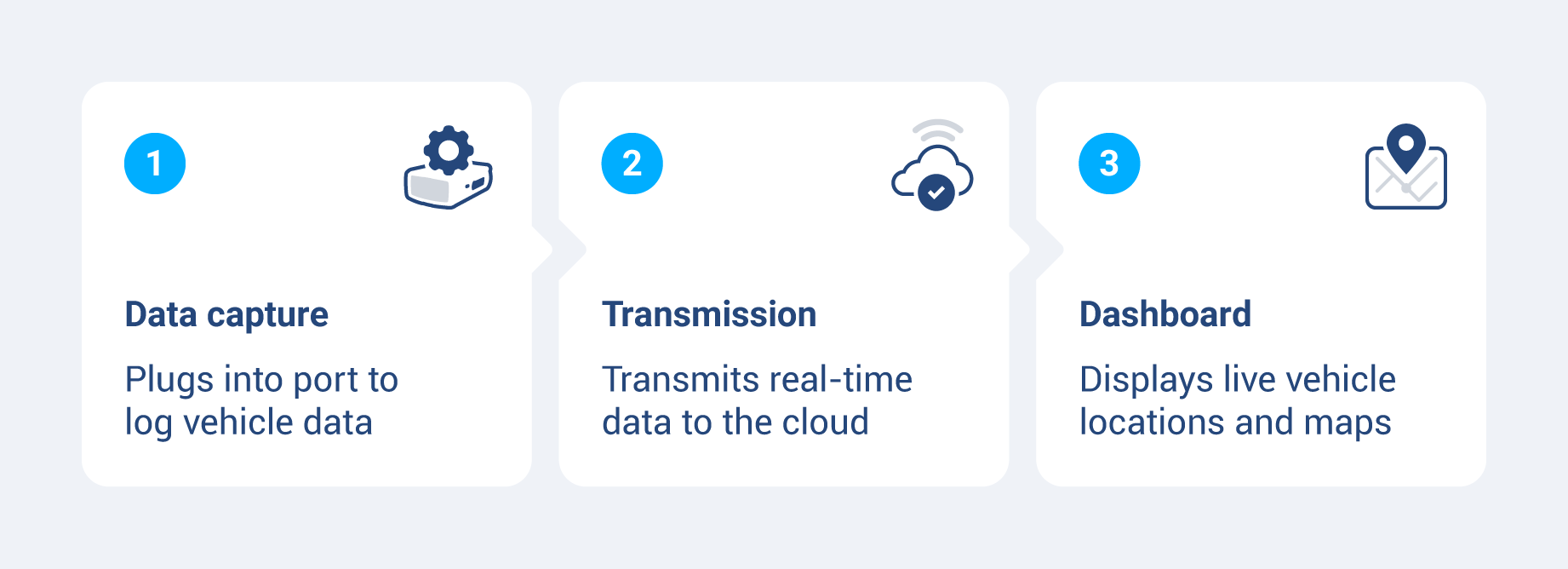
For example, Geotab’s GO device sends location and vehicle performance data to MyGeotab, bringing tracking, vehicle health and driver behavior insights into one platform. Its patented curve-based logging captures changes in position and speed to create detailed trip records, helping teams review routes and investigate driving events.
With this information, an HVAC company can find a nearby van for an urgent service call, check if a driver is still traveling or has parked at a job site, and spot prolonged idling that wastes fuel. The team can also review route history to confirm arrival times when customers have questions and identify unnecessary travel between jobs.
Benefits of GPS fleet tracking for small businesses
For a small fleet, wasted fuel and mileage add up quickly. GPS tracking helps owners spot the causes and measure savings after making changes. Geotab brings location, fuel use and driver behavior data together in MyGeotab, helping teams turn those insights into practical steps, such as reducing idle time, coaching drivers and assigning a nearby vehicle to a customer’s job.
Fuel savings
Tracking shows which vehicles idle excessively or travel more miles than a job requires. Those records can help adjust routes and investigate unauthorized trips.
The U.S. Department of Energy estimates that a heavy-duty truck burns about 0.8 gallons per hour while idling, though fuel use for a smaller work van will differ. Across several vehicles, cutting avoidable idle time can produce meaningful savings. Route optimization can also reduce mileage and fuel costs.
Driver safety and accountability
Fleet tracking can flag harsh braking, rapid acceleration, speeding and sharp cornering. Managers can pull up a specific event, such as a hard-braking alert on Tuesday's route, and walk through it with the driver. Coaching drivers out of risky habits may reduce vehicle wear and collision risk.
Lower insurance premiums
GPS fleet tracking can help small businesses qualify for savings through insurers’ telematics programs. Driving data gives participating insurers insight into fleet safety, while alerts and driver coaching tools help teams address risky behaviors. Ask your insurer which devices and programs qualify, since eligibility and discounts vary by policy.
Better customer service
A live vehicle map helps dispatchers give customers a more precise arrival estimate. A plumber can say, “Your technician is about 12 minutes away,” instead of offering a broad window from 10 a.m. to 2 p.m. Some platforms can also send customers automated ETA updates, reducing the need for check-in calls.
Reduced unauthorized vehicle use
After-hours and geofence alerts can notify an owner when a company vehicle moves outside its approved schedule or area. Clear vehicle-use rules, paired with tracking, discourage personal trips and give the business a record to review if one occurs.
That record could matter if a collision leads to a dispute over how the vehicle was being used, although tracking does not eliminate liability.
What to look for in a GPS fleet tracking system
Start with the problems you need to solve, such as rising fuel costs or difficulty dispatching drivers. Then compare systems based on the features you’ll use, the effort required to set them up and the full cost of keeping them running.
Pricing and contract terms
Most providers charge a monthly fee per vehicle. Some providers include the device with the subscription, while others charge for hardware upfront and then bill for service. Hardware costs for fleet GPS tracking vary by device type, and hardwired installations may add labor costs.
Ask for a quote that includes setup fees and any add-ons, then check the minimum term and early termination fees. A month-to-month plan or trial can give a small business room to evaluate the system before making a longer commitment.
Ease of setup and use
Without a dedicated IT team, a small business needs a system its staff can install and learn quickly. Check if you can install a compatible plug-in device without professional help, and try the dashboard during a demo to see how easily you can find a vehicle or review a trip. A useful mobile app should let you check fleet activity when you’re away from your desk.
Real-time alerts and notifications
Look for alerts you can tailor to your operation. For example, Geotab’s MyGeotab lets teams set rules around fleet activity, such as speeding and movement outside approved areas. A delivery business could use these alerts to prioritize driver coaching, while a construction fleet could monitor equipment leaving a job site or moving after hours.
Reporting and analytics
Daily trip summaries and driver behavior reports can show where time is being lost. Depending on the vehicles and available data, fuel reports or mileage records may also help with accounting and job costing.
Ask providers to demonstrate the reports you need and show how to export them as a CSV or PDF. Confirm that essential reports are included in the quoted plan and are easy to find.
Integration with other business tools
If your team already uses dispatching or maintenance software, check whether fleet data can flow into those systems. Fuel card and accounting integrations may also reduce manual entry and make vehicle costs easier to track. For custom workflows, ask whether the provider offers an open API and what the access costs are.
Customer support
A tracker that stops reporting can disrupt dispatch, so find out how quickly you can reach someone for help. Ask each provider about phone support hours and who handles device replacements or installation issues. Before buying, read recent G2 or Capterra reviews for patterns in customers’ support experiences.
How to implement GPS fleet tracking in your small business
Start with a small rollout to verify that the devices work and the reports answer your questions. Use the first month to establish a baseline, then adjust routes or driver guidance based on what you learn.
- Audit your fleet. List each vehicle, its main use and the problem you most want to solve. Note recurring issues such as fuel waste or late arrivals.
- Define your requirements. Decide if location tracking is enough or if you also need predictive maintenance alerts, which use vehicle data to flag potential issues before a breakdown, and driver scoring, which rates driving behaviors such as speeding and harsh braking to help you identify coaching opportunities.
- Request demos and trials. Compare two or more providers using the same tasks, such as locating a vehicle and reviewing a completed trip. If trials are available, test the systems with your own vehicles.
- Install the devices. Plug compatible OBD-II trackers into light-duty vehicles according to the provider’s instructions. Arrange professional installation for vehicles requiring a hardwired device or a vehicle-specific harness.
- Set alerts and geofences. Start with the notifications you’ll act on, such as after-hours movement or excessive idling. Add virtual boundaries around relevant locations and adjust alert thresholds if you receive too many.
- Brief your drivers. Explain what the system tracks and why you’re using it. Tell drivers how the data will be reviewed and give them a chance to ask questions before tracking begins.
- Review the first 30 days. Compare routes and idle time across vehicles to find opportunities for improvement. Share useful findings with drivers and update your settings as needed.
Choose the right GPS fleet tracking solution for your small business
The right system should help you address the problems identified in your fleet audit and get more value from every vehicle. Geotab’s small business solutions bring location tracking, vehicle health insights and driver safety data into one platform, helping you simplify dispatch, plan maintenance and identify opportunities to reduce fleet costs.
Explore how the GO device works with Geotab’s fleet management software, then request a demo to see how those insights can support your team’s daily work.
Subscribe to get industry tips and insights
Frequently Asked Questions
The best device depends on your vehicles and the data you need. For small businesses, the Geotab GO device brings location tracking, vehicle diagnostics and driver safety data together, helping teams monitor vehicles, spot potential maintenance issues and support safer driving. Check vehicle compatibility before choosing a device.
Businesses can generally track company vehicles for work purposes, but requirements vary by location and circumstance. Tell drivers what you track, when tracking occurs and how you use the data, then consult legal counsel about the rules that apply to your fleet.
The best choice depends on your fleet’s needs. MyGeotab lets small businesses view vehicle locations and set driving alerts from a phone. Compare those features and total cost against other providers before deciding.
Not necessarily. Some providers offer month-to-month service, while others require an annual or multiyear commitment. Before signing up, check the minimum term, device costs, cancellation fees and what happens if you add or remove vehicles.
Geotab team
Table of Contents
- 1. Geotab
- 2. Samsara
- 3. GPS Insight
- 4. Verizon Connect
- 5. One Step GPS
- How GPS fleet tracking works
- Benefits of GPS fleet tracking for small businesses
- What to look for in a GPS fleet tracking system
- How to implement GPS fleet tracking in your small business
- Choose the right GPS fleet tracking solution for your small business
Subscribe to get industry tips and insights
Related posts
How to start a trucking business: Step-by-step guide for owner operators
October 28, 2026
6 minute read

Garbage truck safety: Three questions for your video review process
October 28, 2026
4 minute read

How private haulers can help prepare their fleets for new waste management contracts
October 23, 2026
4 minute read


Top seven best fleet fuel cards: How to choose the right one for your business?
October 1, 2026
7 minute read